Changelog
Detailed technical changelog for all versions of the Temporal Interference Toolbox. Entries include implementation changes, compatibility notes, and fixes. For a condensed, user-facing summary, see Version History and the latest release page.
Unreleased
Nothing yet.
v3.0.2 — September 28, 2026 (Latest Release)
A patch release for everyone on v3.0.x; update the desktop app and the image together (the
image adds DIPY for the new DTI fit). The highlights: DTI conductivity tensors are now placed and
oriented correctly, so anisotropic (vn, dir, mc) simulations from v2.3.0 through v3.0.1 need
Extract DTI tensor and then those simulations re-run (see the
v3.0.2 release notes); QSIRecon is no longer needed for the
tensor; simulations, flex-search, ex-search and DTI QC get lean, cited reports; and charm no longer
freezes on many-core machines. Script users: the report-building classes and the combined
preprocessing report are removed. Other projects, saved scenes and results open unchanged.
DTI
- Fixed: anisotropic (DTI) conductivity tensors were misplaced and misoriented — the tensor TI-Toolbox wrote into
m2m_<id>/DTI_coregT1_tensor.nii.gzwas aligned to the head model by a shift only, although QSIPrep’s space is also rotated (about 21° on the test subject); the tensors were not rotated with it, and resampling spread values outside the brain. On the test subject tensors sat 18 mm off on average with a 38° median error in fibre direction. The DTI step now fits the tensor itself with DIPY from QSIPrep output and maps it with QSIPrep’s exact transforms, rotating every tensor; it writesDTI_coregT1_qc.jsonand refuses to write a tensor that fails its QC gate. Affected:vn,dirandmcsimulations from v2.3.0 through v3.0.1; isotropic (scalar) results are unchanged. Re-run the DTI step (Pre-processing ▸ Extract DTI tensor, with Replace and rerun) and then those simulations; QSIPrep output can be reused. - The DTI tensor no longer needs QSIRecon — Extract DTI tensor now runs straight after QSIPrep (and charm). QSIRecon is an optional advanced step for tractography, scalar maps and connectivity; its preselected
dsi_studio_gqispec now produces scalar maps only, without the 5-million-streamline tractography. Choosing connectivity atlases needs QSIPrep run with the new MNI normalization option. The Docker image gainsdipyfor the fit. - QSIPrep chooses its settings from your data — distortion correction is always on: TOPUP with a reverse phase-encoding fieldmap (TI-Toolbox adds
IntendedFor, and a derivedTotalReadoutTime, to that fieldmap’s sidecar when missing), otherwise fieldmap-less SyN; a DWI fieldmap that exists but cannot be used stops the run with the reason. Unringing isrpgfor partial-Fourier data, otherwisemrdegibbs; output resolution is the DWI’s native voxel size; MNI normalization is skipped unless needed. Every option stays in Configure QSIPrep; a value you saved there before is kept. - QSIPrep refuses to start on Apple Silicon — it always failed there at SynthSeg, an hour in, because emulation lacks the AVX instructions it needs. It now stops at once and explains how to run QSIPrep on an x86-64 Linux or Windows machine and bring the output back; the DTI step runs anywhere.
- A clearer DTI quality-control report — the report the DTI step writes (Results ▸ sub-… ▸ DTI QC report) now opens with the date the tensor was written and a verdict in terms of what the page shows (“Quality gate passed · 2 advisories need attention”, or the failed check by name), the one published-range gate (white-matter diffusivity, with its citations), and a plain callout for anything to act on, such as QSIPrep having run without distortion correction and which fieldmap sidecars lack
IntendedFor. Below come a short preprocessing list, a T1w-versus-FA flicker in three planes, a direction-colour slice scrubber and FA/MD by tissue; software self-checks, the flip test, motion, methods with references and provenance are under Technical details. Every check shows its role (gate, software check, advisory, reported) and its reason. The report follows the app’s light or dark theme, works offline and weighs about 1.2 MB. To rebuild an existing subject’s report without refitting:simnibs_python -m tit.reporting.generators.dti_qc <project> <subject>. The tensor itself is unchanged. - Fixed: a DTI step that failed its quality gate left no report — the report is now written first (verdict: failed, tensor not written) and then the step stops with the error, as before.
Reports
- Every simulation writes a report — after each montage the Simulator writes Results ▸ sub-… ▸ Simulation report, also linked on the job in Jobs. It opens with the grey-matter envelope (its 99.9th percentile and median) and where its maximum is (MNI coordinate), and the montage on the same EEG-cap drawing the app uses, with the current per channel and in total. Then the conductivity model (and whether the DTI tensor was read) and the envelope in three planes through the hot spot. The report has no checks or advisories. Per-carrier fields, methods with references and the run’s configuration are under Technical details. About 0.3 MB. To rebuild one:
simnibs_python -m tit.reporting.generators.simulation <project> <subject> <simulation>. Simulation outputs are unchanged. The 10-10 cap drawing now also places PO9 and PO10, so montages using them get a montage image. - A readable flex-search report — Results ▸ sub-… ▸ Flex-search report now names the target (for example “Thalamus left + Thalamus right”, with its atlas, size and centre) instead of “Target ROI”, and says what the score means in words: “target mean 1.82× the background mean” rather than a bare “score −1.82”. It shows the key numbers from the accepted candidate, the run’s own target and valid-scalp figures, the optimised electrode positions (free scalp positions, so no cap drawing), the dose record with the searched current split, and one row per optimiser run. The final per-channel fields, methods with references and
flex_meta.jsonare under Technical details. The report is written after the run’s manifest, so it is complete, and it weighs about 0.3 MB instead of 7.4 MB (the target and valid-skin figures are embedded at report size). Rebuild one withsimnibs_python -m tit.reporting.generators.flex_search <project> <subject> <run folder>. Optimisation results are unchanged. - Ex-search writes a report — when an exhaustive search finishes, Results ▸ sub-… ▸ Ex-search report (and the job in Jobs) shows the winning montage, ranked by composite (ROI mean × focality), with its electrodes and current per channel and its dose record (electrode size from the leadfield, currents per channel and in total, the current sweep); one chart of every montage’s ROI mean against focality with the top 25 marked; the top 25 as a table you can sort by any column; and the ROI and ranking in plain words. Methods with references and
run_config.jsonare under Technical details. About 0.3 MB for a 47,916-montage search; the search’s own PNG plots are unchanged. Rebuild one withsimnibs_python -m tit.reporting.generators.ex_search <project> <subject> <run name>. - The head-model report is SimNIBS’s own charm report — when charm finishes, its
charm_report.html(segmentation and registration viewer, references) is copied into the subject’s reports and shown as Results ▸ sub-… ▸ Head model (charm) report, and on the charm job in Jobs. The original stays inm2m_<id>, where SimNIBS and your own tools expect it. Head models built before this update keep their report in m2m only; nothing is migrated. - Fixed: report titles and fonts in the app — DTI QC reports are listed as “DTI QC report” instead of “Dti qc”, and reports may use their embedded fonts.
- Removed: the combined preprocessing report — preprocessing no longer writes
pre_processing_report_*.html(its DICOM, atlas, tissue, QSIPrep, QSIRecon and FreeSurfer sections included). Its two reports are the charm report and the DTI QC report. Pipelines run as before; old preprocessing reports already on disk stay listed in Results. Scripts:PreprocessingReportGenerator,create_preprocessing_reportandsimnibs_python -m tit.pre.reportare gone, and the server no longer accepts areportjob kind (oldreportjobs still show in Jobs). - Removed: the report-building classes — scripts can no longer assemble reports by hand:
SimulationReportGenerator,FlexSearchReportGenerator,create_flex_search_report(data=…),ReportAssemblerand the reportlets are gone fromtit.reporting. The pipelines write their reports themselves; to rebuild one from existing outputs usetit.reporting.generators.simulation.create_simulation_report(project, subject, simulation)(andflex_search,ex_search), or thesimnibs_python -m tit.reporting.generators.<name>commands. Reports already on disk still open in Results. - Removed: print layouts for reports — reports no longer carry an A4 print layout (PDF export is not offered); printing from the browser prints the page as it appears on screen.
- Removed:
tit.plotting.generate_static_overlay_images— its only user was the old DTI report. Report slice figures now come fromtit.plotting.slices, which draws every panel in one convention (subject left on image left).
Head model
- Fixed: head-model creation (charm) could freeze indefinitely on many-core machines — on a machine with a large number of CPU cores, running
charmto build a head model could hang forever partway through, with the log showing an OpenBLAS thread-metadata warning. Charm’s own threading is unaffected; the underlying numerical library now stays single-threaded internally as intended.
v3.0.1 — September 23, 2026
A patch release for everyone on v3.0.0; update the desktop app and the image together. The highlights: job-completion notifications, Apple Silicon Macs downloading the image again, an Explode view and one-hemisphere regions for MNI atlases, and run pages that keep the Jobs table readable at any window size. Projects, saved scenes and results from v3.0.0 open unchanged.
Notifications
- A system notification when a job finishes — the desktop app now says what finished and for whom, e.g. Simulation finished · sub-101 · montage L_Insula or Flex optimization failed · sub-102, instead of the old “Job finished” with a job id. Settings → Project → Notifications turns them off, limits them to failures, switches to a minimal title-only form, or picks the sound: one of three short TI-Toolbox sounds (Pulse by default, Chime, Tick; a failure plays it lower), the system sound, or none, with Preview beside it. A saved sound-on setting becomes Pulse and sound-off becomes None. Clicking one brings the app to the front. Cancelled jobs and jobs that had finished before the app opened never notify; each subject of a multi-subject run notifies as it finishes. Send test notification in the same card shows a sample banner with the chosen sound and says whether it appeared, or why not with the fix. Browser sessions are unchanged (no notifications). Developers: a checkout’s Electron is re-signed on
npm installso macOS lets it notify (existing checkouts:npm --prefix desktop run sign:dev-electron).
Launch
- Fixed: the app downloads its container on Apple Silicon Macs — on an M-series Mac with no cached image, starting TI-Toolbox could stop with “no matching manifest for linux/arm64/v8” instead of downloading the TI-Toolbox image. The image is built for Intel/AMD (linux/amd64) and runs under emulation on Apple Silicon; the desktop app now always asks Docker for that platform when it downloads and creates the container, as
loader.shandtit launchalready did, and the shareddocker-compose.ymlnames it too. Intel Macs, Windows and Linux are unchanged, and an image you already have is reused as before. Images are now also published as a plain linux/amd64 image, so older app builds download it again as well.
Atlases
- Explode an MNI atlas to reach deep regions — in MNI space the Optimizer’s and Analyzer’s 3D pane has an Explode button next to Clear selection. The scalp fades out and every atlas region slides outward from the centre, mostly sideways so the left and right hemispheres separate, with the view zooming out to keep them in frame; press it again and they slide back and the scalp returns. Regions keep their shape, hovering and clicking work while exploded, and the selection is not changed. It follows the system’s reduced-motion setting, resets when you change atlas or leave MNI space, and is not offered for a subject’s own head.
- Picking an MNI atlas region selects one side, not both — in MNI space the CIT168 and Harvard-Oxford cortical atlases gave each structure one label covering both hemispheres, so choosing “Putamen” (in the picker or by clicking the 3D pane) selected, and optimized for, both putamens. Both atlases now list each structure per hemisphere (“Left-…”, “Right-…”): CIT168 subcortical nuclei (left/right) has 32 regions and Harvard-Oxford cortical, lateralized (FSL’s own lateralized release) has 96. Pick both sides when you want both. Other atlases and Subject mode are unchanged; they already had one side per region, apart from midline structures such as the cerebellar vermis. A saved configuration or script that names the old
CIT168_labeling_MNI152NLin2009cAsym.nii.gzorHarvardOxford-cort-maxprob-thr25-1mm.nii.gznow stops with a message naming the replacement file, rather than quietly running on different regions.
Interface
- Run pages keep the Jobs table readable at any split — dragging the Terminal/Scene divider on the Simulator, Optimizer, Analyzer, Pre-processing or an extension panel could squeeze the Jobs table until its headers and selects read “SUE”, “F..” or “M”, or stretch it across the whole screen. The Jobs side now stays between 640 and 800 px wide and the Terminal/Scene side keeps at least 400 px; a width you dragged on a bigger window is shown as the widest allowed on a smaller one and comes back when the window grows. Below a 1140 px wide window the page stacks the Terminal/Scene under the Jobs table (previously 1100 px). Expand, collapse (⌘⇧I) and the terminal’s sideways scrolling are unchanged.
- Run asks about existing outputs on the first press — pressing Run in the Analyzer, Simulator or Optimizer for a job whose output was already on disk could show “Could not queue the analysis: Simulation outputs already exist…” when the page’s plan had not caught up with the disk (a run that had just finished, or a plan still resolving), and only a second press opened the Skip / Replace and rerun dialog. The first press now opens the dialog in that case too. Skip now really queues just the new jobs; before, it resubmitted the finished ones as well and the server refused the batch. Nothing is replaced without choosing Replace and rerun, as before. The server’s refusal names the job kind, e.g. “Outputs of this analyzer job already exist”, instead of calling every output a simulation.
- Saved-scene pictures follow the scene — a scene re-saved in TetraVox now gets a fresh preview in Viewer ▸ Saved scenes when you switch back to TI-Toolbox; previously the first picture was kept forever. The scene’s info card also drops repeated rows: Modified and Datasets appear only when they differ from Saved and Layers. Scene files and their
.pngsidecars keep their names. - The app always loads the interface the server has — the page that starts the interface was sent without caching rules, so after an update or rebuild the desktop app could keep running the previous interface for hours (new buttons missing, fixed bugs still there) until its cache expired. It is now checked with the server on every load. Nothing else is re-downloaded: the interface’s files keep their cacheable, versioned names.
Resources
- TI-Toolbox uses 70 % of your cores by default, and you can change it — a new CPU limit in Settings → Project → Execution (10–100 %, shown as e.g. “70 % · 7 of 10 cores”) caps the CPUs all running jobs share. Previously a search defaulted to every core but one and several jobs together could take the whole machine. Ex-/mex-search and cluster-permutation workers, flex-search, FastSurfer/FreeSurfer/CHARM/QSI threads and NIfTI conversion now default to this limit; an explicit
n_jobs/cpus/thread value still works but is capped at it. A change applies to jobs started afterwards; running jobs are not touched. Scripts and notebooks honour the same saved setting. Memory limits are unchanged. API:GET/PUT /api/cpu-limit. - One job per product at a time; “Subjects in parallel” is gone — Pre-processing, Simulator, Optimizer and Analyzer each run one job at a time, whether the jobs come from one multi-subject run or separate runs; the subjects of a run are processed one after another, and any parallelism happens inside a job under the CPU limit. The Subjects in parallel field is removed from Settings → Project → Execution, and
parallel_subjectsfromPOST /api/jobs/groupsandPOST /api/plan/pre. A value saved by an older version, or sent by an older client, is ignored.
Launching on Windows and WSL
- Desktop app finds Docker Desktop on Windows — v3.0.0 reported “Docker was not found on this machine” whenever the active Docker context was
desktop-linux, because itsnpipe:////./pipe/…endpoint was handed to Node with four leading slashes. The app now collapses anynpipe:spelling to//./pipe/<name>, checks Docker Desktop’s install directories fordocker.exewhen the Start-Menu PATH is stale, and probes the context pipe and thendockerDesktopLinuxEngineanddocker_enginewith/_pingbefore giving up. A missing pipe now reads “Docker is installed but not running” with Docker Desktop and WSL 2 guidance; the chosen endpoint is written tomain.log. - TetraVox is TI-Toolbox’s own copy, on every platform — the desktop app now installs TetraVox for itself on Windows too (the official
win-x64.zip, alongside the macOS zips and the Linux tarball), verifying each download against the SHA-256 digest GitHub publishes for the asset, and it launches only that copy. The Locate… picker,PATHlookup and system-location search are gone; Settings → Viewer gains Update, which replaces the copy with the newest release and is refused while TetraVox is open. TI’s copy keeps its own settings and window, so a TetraVox you installed yourself is neither used nor disturbed. Previously Windows reported “Automatic TetraVox setup requires an official updater-compatible package”. - Update TetraVox from Settings or from TetraVox itself — Settings → Viewer now shows the newest TetraVox release next to yours and offers Update to X (or Check for updates when you are current). Inside TI-Toolbox’s TetraVox, its own Software Update window now appears when a newer release exists; Update to X there closes TetraVox, and TI-Toolbox downloads and verifies the release and reopens TetraVox with the last scene it opened. Skip This Version is remembered per version. TI-Toolbox still does every install, the same SHA-256-verified way. The in-TetraVox window needs a TetraVox release newer than 0.6.1; older copies keep their updater off and update from Settings as before. A TetraVox you installed yourself no longer blocks TI-Toolbox’s Update.
- TI-Toolbox’s TetraVox no longer shares your TetraVox settings file or extensions — TI-Toolbox’s copy (and its offscreen picture captures) now keeps TetraVox’s rc file and installed extensions in its own folder instead of your
~/.tetravox, as it already did for window settings. A TetraVox you installed yourself keeps its settings and extensions untouched; TI-Toolbox’s copy starts without them. An already open TI viewer picks this up the next time it is launched. - Loaders inside WSL2 —
loader.shandloader.pytreat WSL as a Windows host: the default UI is the browser, the session URL is printed and opened on the Windows side (wslview, then PowerShell, thencmd.exe), the Linux AppImage is never downloaded, and--desktopis refused with a message naming the Windows installer. WSL is detected fromWSL_DISTRO_NAME/WSL_INTEROP, not the kernel string, so a Docker Desktop container is never mistaken for it.--buildand--webno longer demand a project first.
v3.0.0 — September 20, 2026
v3 replaces the PyQt5 interface with an Electron desktop app backed by the same tit scientific
Python package used by scripts and notebooks. See Installation
for downloads and Desktop Application for the workflow.
Application and project management
- Desktop workspace — workflow pages retain drafts, selections, scroll positions and scene state during a project session. Navigation follows the processing order, controls work in both themes, and failed previews offer an explicit retry without losing opacity settings. Packaged launches open the bundled Overview correctly; Linux
.debpackaging includes the required homepage and maintainer metadata. - Overview — open or switch projects from a subject-readiness matrix with project details, derivative storage totals, an activity calendar and eight recent jobs linked to their results or logs. This replaces Subject Info; older settings that name that panel still load.
- Jobs — long-running operations have persistent state, progress, artifacts and failure details. CPU and memory peak/average measurements cover the whole process tree and survive completion and server restarts; Linux memory accounting avoids double-counting shared pages. The six data columns share available width, narrow tables scroll, and Stage appears in job details rather than the table. Selecting a job restores its details; artifacts list the actual output folder. Confirmed deletion retains failed filesystem removals for retry. After a server restart, interrupted jobs settle as failed unless a completed exit was recorded; they are not resumed automatically.
- Job consoles — completed transcripts and final errors remain visible, live output no longer loses its middle, and reconnects resume without blocking status updates. Scrolling upward disables Follow; enabling it returns to the tail. Stage messages announce starts and completion times without repeated heartbeat lines.
- Submission and resource planning — missing inputs are rejected before queueing with their expected paths and recovery instructions. Plans and workers use the container’s admitted CPU budget, preprocessing parallelism is bounded by that budget, and duration estimates identify their measured baseline or remain blank when none exists.
- Results — browse outputs by subject, preview reports and images inline, and open scenes directly in native TetraVox without leaving the page.
- Settings and extensions — Project, Pre-processing, Extensions, Viewer and Server tabs group configuration; preprocessing preferences persist across projects and links retain their requested tab. Optional Source, Cluster permutation, NIfTI group averaging, Nilearn visuals and 3D exporter tools share an Extensions navigation group, with inputs beside their plans and live logs.
- Notebooks and scripting — Jupyter uses the container’s SimNIBS Python. One packaged example workflow is seeded into projects and refreshed only when the local copy is unedited; API examples live under
examples/scripts/. The Pipeline canvas was removed before release: saved graphs no longer open or execute, while notebooks, jobs and results remain available. - Example data —
ernieandmni152each offer independently downloadable NIfTI and head-model parts through the new-project chooser, Help ▸ Example data, Python or CLI. Downloads use the dedicated example-data repository, verify content, reuse existing subjects regardless of label case and queue selected parts without creating jobs or reinitializing projects.fetch_erniefetches both parts; the REST download route is/api/example-data/{dataset_id}/{part_id}. - Rebuildable caches — viewer data, warped masks and storage scans live under
.ti-toolbox/cache/, excluded through.bidsignoreand identified in Overview storage. Existing caches migrate automatically; results, settings, notebooks, saved scenes and job history stay in place.
Launching and preprocessing
- Launchers and container lifecycle — Bash and Python loaders share the v3 launcher and default to the desktop project picker;
--projectopens a specific project, while--browserand--no-openrequire one. Standalone use needs only a loader and adjacentdocker-compose.yml; cached management commands work offline.--dev [DIR]mounts the selected checkout and builds a missing or stale renderer unlessTIT_DEV_NO_BUILD=1; the separate development loaders are removed. Container reuse or replacement is explicit, an image mismatch cannot replace a running project’s active jobs automatically, and closing Electron stops its session after checking running or queued jobs. - Core runtime —
idossha/ti-toolbox:v3.0.0contains SimNIBS 4.6, FastSurfer and the server-served UI. The desktop manages Docker through its Engine API. The legacy GUI and launcher, Qt, X11 setup and Freeview/Gmsh launchers are removed; see the v2 legacy notice for older workflows. - FastSurfer segmentation — the default structural segmentation produces DKT parcellations using accessible CUDA, managed native Apple MPS or CPU. Apple GPU installation requires consent in Settings ▸ Pre-processing; enablement and thread preferences persist across projects. A stale desktop connection falls back to container CPU before execution, while a host lost during a running job fails that job instead of restarting it. See the FastSurfer guide.
- Optional FreeSurfer and licensing — full reconstruction and T1 thalamic or hippocampal/amygdala subregions run in temporary, separately imaged workers, replacing the persistent service and volume while retaining outputs in the project. TI-Toolbox supplies its bundled license automatically to FreeSurfer, QSIPrep and QSIRecon; personal registration prompts are removed and script/cluster overrides remain supported. FastSurfer segmentation needs no license. For scripts,
run_reconis a deprecated alias forrun_fastsurfer;parallel_recon,parallel_coresandrun_subcortical_segmentationsare dropped. Optional reconstruction uses the explicitrun_freesurferconfiguration and subregion fields. - CHARM and QSI configuration — persistent preprocessing settings expose CHARM denoising, final segmentation resolution and scalp mesh facet size, preserving installed SimNIBS defaults when unset. QSIPrep and QSIRecon use bounded, readable forms with persistent actions; thread controls show available capacity and queued jobs retain their submitted allocation.
Visualization and targeting
- Native TetraVox viewer — full scenes and volume inspection open in a separate native window; run-page surface previews remain embedded. Desktop startup reuses a compatible installation or performs verified initial setup on supported package targets, with locate/retry controls in Settings ▸ Viewer. TetraVox owns subsequent updates: the browser embed, TI-managed updater and rollback controls are removed. Handoffs are serialized and ask before replacing a running scene; browser sessions can download scenes for manual opening. Automatic Linux/Windows setup and native foreground/load acknowledgment remain packaged-release checks.
- Saved scenes — the Viewer provides independently scrolling builder and library panels, deletion, reference-health checks, offscreen thumbnails and file/layer details. Save scene captures the live native scene, including directly opened files, camera and layer edits, into the active project; it requires compatible native saving support. Native snapshots reopen with scene-relative datasets, existing saved scenes need no migration, and preview generation leaves the active view untouched. Save selection and Recent are removed.
- Target selection and previews — Optimizer and Analyzer share synchronized Subject/MNI controls, atlas selection and region colors. Subject space uses the selected subject’s available anatomy; MNI uses reference anatomy. Cortical and subcortical atlas targets are interactive across Flex, Ex and mEx; custom
.nii/.nii.gzmasks accept file drops or paths, with MNI masks registered separately for each subject. Explicit coordinate placement remains in subject space; non-atlas inspection opens in TetraVox. - Atlas catalog — Harvard-Oxford cortical/subcortical, Diedrichsen cerebellum and Schaefer 400/7 MNI volumes join the catalog, with template, type, licensing and citation metadata controlling picker placement. Morel is no longer bundled; existing configurations naming it stop with an explanation. Schaefer is picker-only in the guide preview. See Brain Atlases for attribution and optional user-supplied atlases.
- ROI preparation and confirmation — selected MNI labels are binarized, transformed once, cleaned in subject space and cached for reuse by optimization and analysis. Warping operates on the relevant grid region while preserving SimNIBS voxel results. Island cleanup applies consistently to previews and calculations, always retains the largest component and can change measurements for fragmented regions;
TIT_ROI_KEEP_ISLANDS=1restores raw segmentation. Optimizers save oneroi.tetravox.jsonwith target metadata and existing data references, plus a compressed transformed mask when needed and an optional native thumbnail. This replaces intermediate ROI plates and sidecars;TIT_NO_ROI_PLATE=1or the legacyTIT_NO_ROI_CONFIRMATION=1disables confirmation artifacts. - 3D export — subject-specific atlas, segmentation, montage and field context is previewed before export. Montage rendering uses standalone Blender 4.4.3 to preserve scientific Python dependencies; full-net jobs reserve 16 GiB and other modes 2 GiB. Final baked-image acceptance remains pending; see memory guidance.
Simulation, optimization and analysis
- Simulator — per-job rows support duplication, subject-specific scalp placement, editable XYZ/cap montages and confirmed single or bulk deletion of saved montages without deleting results. Anisotropic models expose tensor ratio and conductivity limits. MNI export is opt-in alongside fsaverage mapping; output conversion tolerates macOS metadata sidecars. Replace and rerun confirms replacement and clears stale session markers without the removed Allow unsafe overrides setting; Skip and Cancel remain available.
- Optimizer — one page combines Flex and Ex/mEx methods, per-job targets and leadfield generation. Subjects stay selectable before leadfields exist, completed generation refreshes automatically, and Ex/mEx execution requires a completed leadfield. Ex/mEx provides clickable cap electrodes with synchronized channel-colored buckets, separate montage/current-split evaluation counts, and corrected planning and standard leadfield filename handling.
- Flex objectives and candidate review — goals include Mean TImax, Max TImax (99.9%), threshold-free focality with a mean non-ROI denominator and explicit intensity weighting, and fixed/adaptive/multi-threshold focality. Historical p95 and legacy scores retain distinct definitions and must not be compared as the same metric. Results links evaluated candidates, intensity–focality plots, exact poses/current splits and replayable Simulator drafts with cap displacement distances. Unsupported unequal-axis ellipses and invalid optimizer results are rejected; scalar mutation settings work, and final electrode simulations honor gel thickness plus 2 mm rubber. See Flex search for objective definitions.
- Analyzer outputs — mesh and voxel analyses write
results.csv,analysis.json, the measured ROI overlay, one weightedhistogram.pngand onescene.tetravox.jsonshowing that overlay on the subject anatomy. A compatible native viewer can addscene.png; older separate ROI/field scenes, PDF histograms and screenshot traces are no longer emitted into the result folder. - Scientific corrections — cluster inference, voxel focality units and affine/grid validation are corrected. Single-subject groups now contribute zero within-group variance rather than turning the entire comparison into a null map; re-run affected single-subject-group comparisons from v2.2.3–v2.5.0. Earlier cluster and voxel-focality results also require assessment for re-running or rescaling; see Cluster permutation testing and Analyzer.
hf_peak_is_exactexposes whether carrier peak estimation is exact; above eight carriers it is a lower bound, not a conservative safety estimate. The positionaltit.calcAPI from v2.5.0 is unchanged.
Security and API compatibility
- Input and filesystem safety — named inputs reject path-shaped values, project access checks resolve symlinks before reads/writes, mask names are bounded, documentation text is rendered safely and search stays on the documentation origin. HTTPS downloads verify certificates using configured or trusted CA bundles; there is no unverified TLS fallback.
- Runtime capabilities —
/api/capabilitiesreports container tools including FastSurfer; obsolete X11, Freeview, Gmsh and FreeSurfer capability flags are removed. Native viewer availability is detected on the host, not exposed as the retiredtetravox_embedcapability; subject-levelhas_freesurferremains available.
v2.5.0 — August 31, 2026
Release Date: August 31, 2026
Additions
TI_normalfor mTI — multipolar simulations now write the normal-component envelope ({montage}_mTI_normal.msh) by default, computed by evaluating the multi-carrier envelope along the cortical surface normal; the analyzer’snormal_*ROI statistics populate for mTI exactly as for standard TI.- fsaverage projection for mTI —
map_to_fsavgno longer skips multipolar runs: the modulation depth is read from the mTI central surface andhf_peak/hf_sarare derived from all N channel volume meshes. - Multipolar exhaustive search (mex-search) — a multipolar counterpart to ex-search (
tit/opt/mex), with a TI/mTI toggle, symmetric (bilateral) buckets, atlas-region and MNI-space ROI targeting, and a shared searchable ROI picker across ex-search and mTI. - Threshold-free focality goal for flex-search — a new opt-in focality objective plus an opt-in current-ratio search, replacing threshold-dependent focality scoring.
- Selectable output fields — the simulator now writes only the fields you choose (TI_max by default) instead of a fixed set, with field definitions documented in the help popup.
- Custom subject masks as ROI targets — label volumes placed under
m2m_<id>/masks/are auto-discovered and offered as subcortical ROI targets in flex/ex/mex-search and the analyzer. - Unified TI/mTI field metrics — carrier grouping, hf_peak sign handling, and the TI/mTI metric surface were corrected and unified across calc, sim and the analyzer, closing several description/code mismatches; a literature-grounded field-metrics note documents the math.
- DWI preflight validation — gradient tables and sidecars are validated and QSIPrep node crashfiles are logged before/at container failure, catching bad DWI conversions early.
- Interactive atlas browser and multipolar TI documentation pages on the docs site, including subject-space atlas assets and a redesigned full-width docs theme with per-page subnav and KaTeX equation rendering.
- Claude Code / AI-assistant plugin (
agent-plugin/) — an MCP server and marketplace listing so AI coding assistants understand the TI-Toolbox codebase, plus a maintainer-verified Troubleshooting Archive. - Faster ex/mex-search — unit-current channel fields are now computed once per montage and reused across current splits, the TI/mTI envelope is evaluated on ROI∪GM only (not the whole head), and candidates run on a forked worker pool (
n_jobs). Ex-search: 0.39 s → 0.05 s per evaluation (~8×; a 4,375-evaluation bucket search dropped from 28 min to 3 min). Mex-search: 58 s → ~1.4–2 s per candidate (~30–40×) via a fused numba kernel for the K≥2 mTI direction search. - Ex/mex-search electrode-map visuals — every ex/mex-search run now writes an electrode participation heatmap and montage strength/focality maps, ported from work by Larissa Albantakis on her ex-search-multipolar branch.
- Zenodo DOIs added for the archived software release.
Changes
- Breaking:
tit.calcconsolidated to exactly three envelope functions —get_TI_vectors(fields, psi=None)(K ≥ 1 carriers; the K = 1 exact closed form is applied internally),get_TI_avg(fields, psi=None), andget_TI_dir(fields, directions, psi=None). Scripts callingget_TI_vectors(E1, E2)positionally must switch toget_TI_vectors([E1, E2]);get_mTI_vectorsis nowget_TI_vectors,get_mTI_dirisget_TI_dir, and the deprecatedget_nTI_vectorsshim and the unusedget_magnitude_amwere removed, as was the legacychannels=carrier-regrouping parameter. - Carrier wiring removed — mTI is always positional (each two consecutive electrodes compose a channel, each two consecutive channels compose a carrier): the mex-search “Carrier Wiring” combo,
MTI_CHANNEL_ARCHITECTURES, and thechannelsJSON config keys are gone (old configs with the key are ignored). - Documentation vocabulary unified across the simulator, analyzer and ex-search pages: electrodes → channels (2 electrodes each) → carriers (shared by 2 channels); TI = 4 electrodes / 2 channels / 1 carrier, mTI = 8 electrodes / 4 channels / 2 carriers.
Fixes
- Analyzer sim-list bug fix, plus analyzer/ex-search layout cleanups (paired Tissue/Space and Field/Type controls, either/or ROI selection, dead vertical space removed).
- Ex-search now rejects empty ROI configs, tolerates header rows in MNI ROI CSVs, and fails cleanly on zero candidates instead of silently returning nothing.
- Flex-search summary.txt no longer prints a raw Python function repr on the Goal line.
- QSIPrep/QSIRecon fixes — the root BIDS dataset description is always created, a missing T1w is reported up front, QSIRecon’s log directory is no longer mistaken for existing output, and a converted DWI arriving without its gradient table now warns instead of failing silently.
- DICOM import — a converted DWI missing its gradient table is now caught and reported.
- Atlas resampling in the analyzer — atlases and tissue masks are now matched to the field on shape and affine and resampled nearest-neighbour, replacing a shape-only check and an interpolating
mri_convertcall that also required FreeSurfer binaries absent from the simulation container. See the note below. - Docs — corrected stale ROI, tissue, atlas, CLI and testing-pipeline claims across the wiki, scripting, ex-search and analyzer pages; fixed release download links and a blank atlas viewer for cached scripts.
- Dev loader —
loader_dev.shrewritten as a working Python-free bash loader after regressions.
Note: atlas resampling in the analyzer
The analyzer’s grid check compared shape only, so an atlas with matching dimensions but a different affine could pass through untouched and produce statistics for the wrong tissue, silently. Resampling also used mri_convert --reslice_like, whose default trilinear interpolation blends discrete region ids into ids that belong to no region. The check now compares the affine too, resampling is nearest-neighbour, and neither step needs FreeSurfer binaries that the simulation container does not ship.
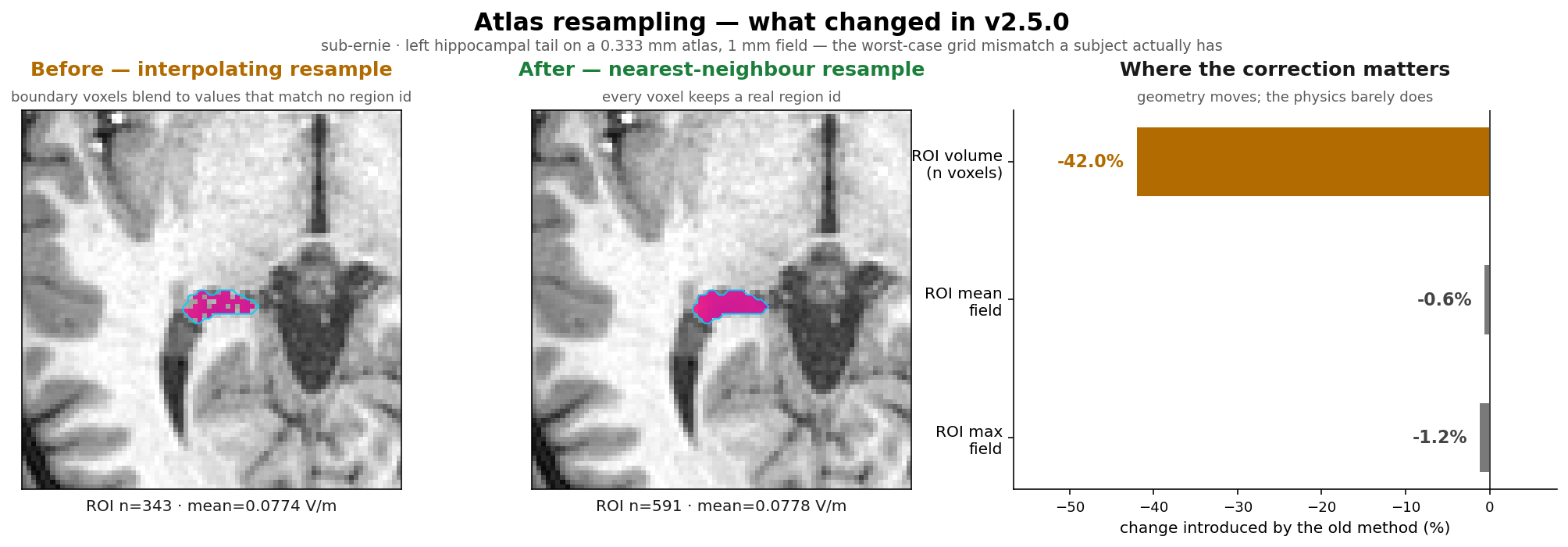
This is a robustness fix, not a result-changing one. Interpolation order only matters when the atlas and field lattices do not coincide, which for the 1 mm FreeSurfer parcellations, the thalamic nuclei and every MNI atlas they do — old and new are bit-identical there. The one exception is the 0.333 mm hippocampal and amygdala subfields, shown above: even in that worst case the reported field changes by ~0.5% (mean −0.6%, max −1.2%) while the ROI volume changes by −42%, because trilinear erodes the region’s boundary. Field statistics from earlier versions stand; ROI voxel counts and volumes from a hippocampal or amygdala subfield ROI are worth regenerating. Details on the Brain Atlases page.
Download Links
Desktop App (v2.5.0): macOS Intel · macOS Apple Silicon · Windows · Linux AppImage · Linux deb
Other:
- Docker Image:
docker pull idossha/simnibs:v2.5.0 - Source Code: GitHub Repository
v2.4.0 — July 20, 2026
Release Date: July 20, 2026
Additions
- Combine multiple ROIs in optimization — flex-search and exhaustive-search can now target the union of several same-type regions (cortical by name including cross-hemisphere, subcortical by label, or multiple spheres) through a searchable region picker with region chips.
- TI safety metrics (Cassarà et al. 2025) — peak carrier field and SAR-driver maps are now written as subject- and MNI-space NIfTI volumes alongside TI_max.
- Surface-based group statistics — run group comparisons and correlations directly on the fsaverage cortical surface with cluster-based permutation testing and inflated-cortex rendering; TI fields now auto-project to fsaverage after each simulation.
- CT and NIfTI ingestion — preprocessing can now import head CT scans and pre-converted NIfTI files (T1w/T2w/CT/DWI), not only DICOMs.
- 3D Visualizer subcortical field export — export subcortical structures colored by a simulation field (PLY) using a searchable label picker.
- Simulator skip/replace policy — choose to skip or overwrite existing simulation outputs instead of aborting with an error.
- Montage visualizer clarity — connection arcs now show which channels interfere (TI partners), with a channel color legend.
- Faster simulations — mesh-to-NIfTI conversion is parallelized, cutting end-to-end simulation time by roughly 30%.
Fixes
- DICOM import crash — fixed a crash on projects seeded with macOS junk (AppleDouble) files.
- QSIPrep preprocessing failures — the root BIDS dataset description is now always created, and a missing T1w is reported up front instead of failing deep in the workflow.
- 3D exporter file loss — fixed the exporter deleting cortical region files after export.
- FreeSurfer data volume versioning — the volume is now versioned by image tag so image updates correctly re-seed it.
Download Links
Desktop App (v2.4.0): macOS Intel · macOS Apple Silicon · Windows · Linux AppImage · Linux deb
Other:
- Docker Image:
docker pull idossha/simnibs:v2.4.0 - Source Code: GitHub Repository
v2.3.2 — June 11, 2026
Release Date: June 11, 2026
Additions
- New Source tool (extension): build MNE EEG forward solutions and project TI fields onto the fsaverage template.
- Preprocessing now automatically converts DWI DICOMs to BIDS NIfTI alongside T1w/T2w.
Fixes
- FreeSurfer recon-all no longer falsely reports its output as already existing on a fresh project.
Download Links
Desktop App (v2.3.2): macOS Intel · macOS Apple Silicon · Windows · Linux AppImage · Linux deb
Other:
- Docker Image:
docker pull idossha/simnibs:v2.3.2 - Source Code: GitHub Repository
v2.3.1 — May 8, 2026
Release Date: May 8, 2026
Focused maintenance release for preprocessing robustness, GUI reliability, QSI container compatibility, flex-search validation tools, and NIfTI viewer usability.
Fixes & Maintenance
Flex-search and Simulation Workflow
- Flex-search simulation identity and UI naming — simulator-generated flex-search runs now keep a unique storage key while showing compact, readable run labels and hover metadata in the GUI, following the run-id/run-name split used by tools such as MLflow.
- Flex-search valid skin region controls — flex-search now exposes
skin_region_margin_mm, optional landmark guarding, GUI controls, and report imagery so users can inspect and tune the valid scalp placement region used by optimization.
Reports and Visualization
- Report and visualization follow-ups — simulation reports use clearer missing-visualization states and simulations continue when optional montage visualization cannot be generated.
- Analyzer discovery improvements — Analyzer refreshes simulation lists when shown and after simulation completion, with clearer messages when TI/mTI post-processing outputs are missing.
NIfTI Viewer
- Electrode NIfTI overlays — the NIfTI Viewer can create and auto-load a single label-mask overlay showing saved electrode placements from
documentation/config.json. Labels are channel-based, use the same color order as montage PNGs, and are saved next to montage images underTI/montage_imgs/ormTI/montage_imgs/depending on simulation mode.
GUI Reliability
- GUI lifecycle reliability — preprocessing, simulation, flex-search, ex-search, Analyzer, and NIfTI Viewer tabs now refresh dependent outputs more consistently and avoid reporting success after failed subprocesses.
Preprocessing and QSI
- DICOM preprocessing hardening — DICOM discovery now searches nested
.dcm/.dicomfiles and supports basic compressed inputs (.zip,.tar,.tar.gz,.tgz) in the documentedsourcedata/sub-{id}/{T1w,T2w}/dicom/layout. - Preprocessing existing-output handling — the GUI now detects existing outputs before rerunning DICOM conversion, CHARM, FreeSurfer
recon-all, QSIPrep, QSIRecon, or DTI extraction. Users can cancel, skip existing outputs, or explicitly replace them and rerun. The same policy is available to scripts throughskip_existing_outputsandreplace_existing_outputs. - QSI Docker preflight — QSIPrep and QSIRecon now validate Docker/DooD setup early, before starting long-running container work.
- QSI containers updated — QSIPrep and QSIRecon now target PennLINC
26.0.0, with CLI compatibility handling for QSIPrepconcatand QSIRecon--input-type qsiprep.
Telemetry and Release Operations
- Telemetry error grouping — operation telemetry now emits a per-run
run_idplus a stable, path-sanitizederror_fingerprint, making recurring failures easier to group without sending tracebacks or local paths. - Telemetry-driven preflight checks — common user/environment problems are validated before telemetry-tracked work starts for simulation, flex-search, and empty preprocessing subject selections, reducing noisy error reports while preserving real exceptions.
- Telemetry consent persistence — GUI telemetry consent is stored in the user-level config mount and should no longer reappear every launch once answered.
- Launcher telemetry normalization — host OS and architecture values are canonicalized across the Electron launcher and
loader.py, keeping telemetry slices consistent across entrypoints. - Community link — README and release help links now point to the active TI-Toolbox Discord server.
- Release-gate tests — added Dockerfile.test-based integration checks plus a self-contained comprehensive release-gate entry point using only test-environment fixtures.
Download Links
Desktop App (v2.3.1): macOS Intel · macOS Apple Silicon · Windows · Linux AppImage · Linux deb
Other:
- Docker Image:
docker pull idossha/simnibs:v2.3.1 - Source Code: GitHub Repository
v2.3.0 — March 17, 2026
Release Date: March 17, 2026
A major release with new analysis capabilities, broader simulation support, diffusion pipeline integration, and a modernized codebase built on SimNIBS 4.6.0.
Preprocessing & Segmentation
- Subcortical sub-nuclei segmentation — hippocampal and thalamic sub-nuclei are now automatically segmented as part of the FreeSurfer recon-all pipeline.
- QSIPrep / QSIRecon integration — diffusion MRI preprocessing and reconstruction are now available through the GUI and CLI, including DTI extraction for anisotropic simulations. This still needs further validation, but works well internally.
- MASSP2021 nuclei atlas — added under the MNI resources as a built-in subcortical atlas for targeting thalamic and brainstem nuclei. Can be selected in the group-level visualization step.
Simulation & Optimization
- Upgraded to SimNIBS 4.6.0 — the underlying finite-element engine is now at its latest version, bringing improved meshing and solver accuracy.
- Anisotropic conductivity in optimization — flex-search now supports all 4 SimNIBS conductivity models (isotropic, volume-normalized, direct, and mean-conductivity). Select via the GUI dropdown or the
anisotropy_typeconfig parameter. Fine-tune withaniso_maxratioandaniso_maxcond. - White matter / gray matter tissue targeting — flex-search lets you choose whether to optimize over gray matter, white matter, or both.
- Focality Pareto sweep — new tool to systematically explore the trade-off between field intensity and focality across a grid of threshold combinations, producing a Pareto plot and summary table.
- Batch simulation — run multiple simulation configurations in sequence from a single GUI session.
Analysis
- Combined multi-ROI analysis — select multiple atlas regions and analyze them as a single combined ROI. Outputs use a
+-joined naming convention (e.g.,precentral+postcentral/). - Tissue-type selection in analysis — choose GM, WM, or both when running voxel-space analyses.
Infrastructure & Usability
- Singularity / Apptainer support — run TI-Toolbox on HPC clusters without Docker.
- HTML report generation — automated reports for simulation and preprocessing results.
- Redesigned GUI — modernized styling, consistent console output, and reusable ROI/electrode/solver widgets across all tabs.
- Simplified Python scripting API — cleaner imports and flat configuration dataclasses make scripting simulations, optimizations, and analyses more straightforward. See the updated API documentation for examples.
- Improved CI/CD and test suite — comprehensive automated testing with coverage tracking.
Breaking Changes (for scripters)
- The Python API has been significantly simplified. If you have scripts that import from
tit, please refer to the updated API documentation for the new import paths and configuration classes. Key changes:
Download Links
Desktop App (v2.3.0): macOS Intel · macOS Apple Silicon · Windows · Linux AppImage · Linux deb Other:
- Docker Image:
docker pull idossha/simnibs:v2.3.0 - Source Code: GitHub Repository
v2.2.4 — January 16, 2026
Release Date: January 16, 2026
Additions
- N/A
Fixes
- Loader Program: Fixed example data and initiliazation of the BIDS files. Also, should be handling X11 more gracefully.
Download Links
Desktop App (v2.2.4): macOS Intel · macOS Apple Silicon · Windows · Linux AppImage · Linux deb Other:
- Docker Image:
docker pull idossha/simnibs:v2.2.4 - Source Code: GitHub Repository
v2.2.3 — January 7, 2026
Original Release Date: January 07, 2026 Effective Release Date: January 14, 2026 (re-uploaded tag with preprocessing refactored to deal with recon-all problem without releasing and official new image. Should be updated automatically to all users without breaking behavior).
Additions
- New Blender Tool for Full Blend File Creation: Complete Blender integration with automated blend file generation, electrode positioning, and visualization setup. Streamlined workflow for creating publication-ready 3D visualizations directly from simulation results.
- Ex-search: Added an option to run the a truly exhaustive search option as all selected electrodes are pooled together instead of placed in stationary buckets. Refer to ex-search wiki tab for more information.
- New Correlation Mode for Cluster-Based Permutation Testing: Enhanced statistical analysis capabilities with correlation-based cluster permutation testing, providing more robust statistical inference for connectivity and relationship analyses.
- Unified Command-Line Experience: All CLI tools now support both interactive mode (run without arguments) and direct mode (with flags). Consistent colored output, clear prompts, and intelligent option discovery across all commands.
- Multi-Processing Simulator: Parallel processing capabilities for faster simulation runs, optimized resource utilization, and scalable performance across different hardware configurations.
- Enhanced Testing Suite Coverage: Comprehensive test coverage expansion including simulator workflows, statistical analysis pipelines, and integration testing for improved reliability and stability.
- Improved Security CI/CD Pipeline: Strengthened GitHub Actions workflows with enhanced security scanning, automated vulnerability detection, and improved code quality gates throughout the development pipeline.
- Refactored pre-processing tools: Removed all bash scripts to improved maintainability and reduce complexity. Updated all relevant benchmarks, tests, and docs.
Fixes
- Experimental Movea Tool: Temporarily removed the experimental movea tool to focus development efforts on core functionality and stability.
- Bug Fixes & Reliability: Fixed GUI crashes and timeout issues. Improved path handling and import reliability. Updated electrode templates for better compatibility. Enhanced security scanning and CI/CD workflows.
- Documentation Updates: New CLI and GUI documentation pages. Improved Blender integration instructions. Added visualizer documentation. Better organization of documentation images.
Download Links
Desktop App (v2.2.3): macOS Intel · macOS Apple Silicon · Windows · Linux AppImage · Linux deb Other:
- Docker Image:
docker pull idossha/simnibs:v2.2.3
v2.2.2 — December 25, 2025
Release Date: December 25, 2025
Additions
- Simulator Refactoring: Complete rewrite from bash to Python with modular architecture including progress callbacks, better error handling, and improved logging.
- Enhanced Cluster Permutation Testing: New ACES-like correlation investigation, support for continuous variables, enhanced reporting, and improved GUI integration.
- Comprehensive Testing Infrastructure: new test files with code coverage integration, headless operation support, and improved CI/CD pipeline.
- Improved 3D Visualization: Enhanced visual exporter with automatic electrode placement, metadata extraction, GLB format export, and Docker-based Blender integration.
- Pythonic CLI Migration: New Click-based command-line interfaces for simulator and cluster permutation tools with better argument validation.
- GUI Enhancements: Improved threading across all tabs with real-time progress updates, better error handling, and enhanced responsiveness.
Fixes
- Various Bug Fixes: Fixed silent timeout issues in CI, corrected coverage integration, improved error handling in all major modules, better cleanup of temporary files, and enhanced logging.
- Windows Electron: A more robust executable delivery on Windows.
Download Links
Desktop App (v2.2.2): macOS Intel · macOS Apple Silicon · Windows · Linux AppImage · Linux deb Other:
- Docker Image:
docker pull idossha/simnibs:v2.2.2
v2.2.1 — December 4, 2025
Release Date: December 04, 2025
Backward compatibility change to be aware:
- Electode Mapping: We changed the mapping functionality from the flex-seach to the simulator. This to provide a more flexible and dynamic framework. Now, the flex-search outputs the:
electrode_positions.jsonfile and the mapping functionality happeneds on the simulator side using the new methodti-toolbox/tools/map_electrodes.py. Thus, one can use a single flex-search to conveniently map to multiple nets.
Additions
- Desktop App: Recognizing the importance of Desktop delivery, we redesign our executables with Electron. For more info please see
package. - Benchmarks: Added benchmarking tool with sensible defaults that users can run on their systems
- AMV: Improved automatic montage visualization that now supports all available nets with a higher resolution image.
- Flex-search: Added more control over electrode geometry now supporting rectengular and width control.
- Flex-search: Exapnded hyper-parameter control. tolerance and mutation rate.
- Ex-search: Enhanced the ex-search with current ratio optimization, enabling more robust optimization process. The exhaustive search now evaluates possible electrode montages and current ratios according to the formula:
Fixes
- Various Bug Fixes: protection overwrites, documentation, output formatting, UI improvements, parallel processing, electrode management
Download Links
Desktop App (v2.2.1): macOS Intel · macOS Apple Silicon · Windows · Linux AppImage · Linux deb
Other:
- Docker Image:
docker pull idossha/simnibs:v2.2.1
v2.2.0 — November 7, 2025
Release Date: November 07, 2025
Additions
- Core Infrastructure & Architecture: The project underwent a complete restructure, removing old launcher directories and consolidating to a unified ti-toolbox structure. A new core module system was introduced in ti-toolbox/core/ with reusable components including paths.py, calc.py, constants.py, errors.py, process.py, utils.py, nifti.py, mesh.py, and viz.py. The project moved away from executable compilation and now focuses exclusively on bash entry point.
- GUI Extensions System: A new modular extension system was introduced in ti-toolbox/gui/extensions/ providing several powerful tools. The Cluster-Based Permutation Testing (CBP) extension offers statistical analysis for group comparisons. Nilearn Visuals enables brain visualization using nilearn with glass brain views, surface plots, and slices. The NIfTI Group Averaging tool allows averaging multiple NIfTI files across subjects. The Visual Exporter provides export capabilities to Blender-compatible formats (PLY, STL) with a full tutorial. Additional extensions include Quick Notes for in-app note-taking with persistence, Subject Info Viewer for displaying metadata and processing status, and an Electrode Placement Tool for interactive electrode positioning.
- 3D Visualization & Export: A 3D Exporter module was added in ti-toolbox/3d_exporter/ containing four specialized tools. TI_quick_volumetric.py provides fast volumetric field exports, cortical_regions_to_ply.py handles region-specific mesh exports, cortical_regions_to_stl.py outputs STL format for 3D printing, and vector_ply.py enables vector field visualization in Blender.
- MOVEA Optimization: MOVEA-like integration was implemented for multi-objective optimization of electrode placement. The system now uses a centralized leadfield with unified leadfield target locations across all optimization tools. A complete MOVEA GUI tab provides an interface for optimization workflows.
- Analysis Tool: Group Analyzer received significant improvements including enhanced multi-subject analysis capabilities with MNI coordinate support.
- Statistics Module: A statistics package was created in ti-toolbox/stats/. The cluster_permutation.py module implements non-parametric cluster-based permutation testing.
- Simulator Improvements: The simulator received substantial enhancements including a new free-hand mode that allows direct electrode coordinate input without montage selection. The entire simulator was refactored for a cleaner codebase with better error handling.
- Optimization Tools: The flex-search tool was restructured and modularized into ti-toolbox/opt/flex/. A multi-start approach was implemented allowing multiple iterations to find the best solution. The ex-search tool received enhancements for better ROI handling and faster analysis.
- GUI Enhancements: Multiple GUI improvements enhance the user experience. A centralized Path Manager handles path operations across all GUI tabs. Console output was standardized for consistent logging and status updates. Confirmation dialogs now appear before long-running processes. A debug mode provides optional verbose output for troubleshooting. An OpenGL fallback system provides automatic compatibility handling for macOS issues.
- Documentation: More documentation was added covering new features. New wiki pages document cluster permutation testing, electrode placement, MOVEA optimization, tissue analyzer, visual exporter, nilearn visuals, nifti group averaging, and quick notes. A pipeline flow diagram provides visual representation of the complete workflow. A detailed Blender tutorial offers step-by-step guidance for 3D visualization. Installation documentation was streamlined with updated setup instructions and removal of executable references. The gallery was updated with new screenshots showcasing all GUI features.
- CI/CD & Testing: A CI/CD pipeline was implemented with automated testing and Codecov integration for code coverage tracking. The test suite was expanded covering most modules, including new test files for calc, constants, core integration, mesh, errors, ex-analyzer, nifti, paths, process, utils, and MOVEA optimizer with integration tests. CircleCI integration now provides automated testing on every commit with proper permissions and workflows.
- Development Tools: Developer experience was improved with enhanced dev environment setup in dev/bash_dev/ for contributors. Version control management was improved for better consistency across all files. The project standardized on the simnibs_python interpreter for all Python operations. Container communication between FreeSurfer and SimNIBS was enhanced for better data sharing.
Fixes
- Bug Fixes & Refinements: Numerous bug fixes and refinements were implemented including BIDS structure compliance improvements, resolution of deadlock issues in GUI tabs, improved overwrite protection across all tools, fixed electrode naming consistency, better handling of network volumes, X11 and OpenGL fixes for cross-platform compatibility, and reduced console bloat with improved logging throughout the application.
- Removals & Cleanup: Significant cleanup was performed removing all executable launcher code (over 7,000 lines), eliminating old MATLAB dependencies, removing outdated documentation and assets, cleaning up redundant development files.
Download Links
- Docker Image:
docker pull idossha/simnibs:v2.2.0 - loader.sh - Main launch script
- docker-compose.yml - Docker configuration
v2.1.3 — October 8, 2025
Release Date: October 08, 2025
Additions
-
- Executable Launcher: pre-flight check for existing containers to avoid start conflicts.
-
- Executable Launcher: validation of path input (for mannual inputs)
-
- Flex-search: dynamic focality thresholding for better output
-
- Development: Added a watchdog for easier GUI development
-
- Analyzer: Added
labeling.nii.gzas an option for voxel analysis w/o need for recon-all
- Analyzer: Added
Fixes
-
- General: Removed env limits for flex-search, cleaned up GUI tabs, fixed Gmsh GUI lauchner with analysis visuals, fixed example data (ernie, MNI152) mounting in executable mode, clean up of executable console output.
-
- Critical: Batch processing of sub-cortical targets in flex-search mode. Previous,
labeling.nii.gzwas no updating between subjects, causing incorrect optimization targeting.
- Critical: Batch processing of sub-cortical targets in flex-search mode. Previous,
Download Links
v2.1.2 — September 8, 2025
Release Date: September 08, 2025
Additions
- Example Dataset: Toolbox now ships with Ernie & MNI152 MRI scans for quick start & learning purposes.
- Tissue Analyzer: Added skin thickness and volume analysis
Fixes
- Various bug fixes: charm, ex-search, flex-search
Download Links
v2.1.1 — August 28, 2025
Release Date: August 28, 2025
Additions
- N/A
Fixes
- ex-search: fixed final.csv output
- flex-search: fixed cleanup of directory if users choose a single start
Download Links
v2.1.0 — August 25, 2025
Release Date: August 25, 2025
Additions
- Improved BIDS formatting: Enhanced Brain Imaging Data Structure (BIDS) compliance and formatting for better data - organization and compatibility
- Debug mode for console output: Introduced comprehensive debug mode with detailed console logging for troubleshooting and development
- Inter-individual variability assessment: New bone analyzer tool integrated into pre-processing pipeline for assessing anatomical variations between subjects
- Multi-start approach for flex-search optimization: Implemented multi-start optimization strategy to counter local maxima issues in electrode placement optimization
Fixes
- Removed MATLAB runtime dependency: Eliminated MATLAB runtime requirement, making the toolbox fully independent and easier to deploy
- mTI bug fixes and upstream integration: Resolved critical bugs in mTI (multi-channel Temporal Interference) functionality and improved integration with upstream SimNIBS components
- Enhanced X11 handling for macOS: Improved X11 server integration and display management for better GUI - functionality on macOS systems
- Official rebranding: Complete renaming from TI-CSC to TI-Toolbox across all components, documentation, and user interfaces
Download Links
v2.0.5 — July 10, 2025
Release Date: July 10, 2025
Additions
- Group Analysis Features: Group analysis system with GUI interface, comparison capabilities, and logging
- Focality Measurement: New focality analysis tools with histogram generation for cortical analysis
- Normal Component Analysis: Added normal component matrics and visualization
- Enhanced Workflow: Multiple subject selection for flex-search, new naming conventions
Fixes
- GUI Stability: Multiple bug fixes for group analysis GUI, element resizing, console widget consistency, and special character handling
- Analysis Accuracy: Improved histogram generation, ROI comparison plots
- Visualization: Fixed mesh visualization and updated mesh visualizer functionality
Download Links
v2.0.4 — June 26, 2025
Release Date: June 26, 2025
Additions
- flex-search -> simulator integration. Simulator now recognizes previous flex-searches and allows for simulation of both optimized and mapped electrodes.
- system monitor -> added a GUI tab that allows users monitor the activity of processes hapenning within the toolbox
Fixes
- pre-process -> added missing shell for recon-all step
- pre-process -> fixed parallalization problem
- ex-search redesign -> now is not dependent on MATLAB Runtime, but is fully Python implemented
- ex-search -> users can now creat multiple leadfields for the same subject
- flex-search -> post processing method for TI envelope direction is implemented
Download Links
v2.0.3 — June 20, 2025
Release Date: June 20, 2025
Additions
- Modified tes_flex_optimization.py to include eeg_net field in the .json
- toggle between “Montage Simulation” (traditional) and “Flex-Search Simulation” with automatic discovery of optimization results and electrode type selection (mapped/optimized/both)
- Modified TI.py and pipeline scripts to handle direct XYZ electrode coordinates instead of just electrode names, enabling optimized electrode positioning from flex-search results
Fixes
- N/A
Download Links
v2.0.2 — June 19, 2025
Release Date: June 19, 2025
Additions
- Enhanced X11 support for Windows with automatic host IP detection and VcXsrv/Xming configuration guidance
- Created
windows_x11_setup.shhelper script for simplified Windows X server setup - Added comprehensive Windows BIDS path guide (
WINDOWS_BIDS_PATH_GUIDE.md) with troubleshooting tips - Improved cross-platform X11 configuration with better error handling and user guidance
- Added OpenGL software rendering flags for better GUI compatibility across all platforms
Fixes
- Fixed volume mounting in docker-compose.yml - all required volumes now properly mounted to simnibs container
- Fixed Windows path handling - automatic conversion of backslashes to forward slashes for Docker compatibility
- Fixed paths with spaces on Windows - automatic quoting of paths containing spaces
- Fixed X11 socket mounting for macOS XQuartz and Linux compatibility
- Fixed DISPLAY environment variable configuration for Windows, macOS, and Linux
- Fixed MATLAB Runtime library paths in container environment
- Updated XQuartz version warning to reference memory about v2.7.7 compatibility requirement
Download Links
v2.0.1 — June 11, 2025
Release Date: June 11, 2025
Additions
- new logger and report generators under ‘projectDIR/derivatives/’
- sub-cortical atlas based targeting for flex-search (example: thalamus targeting)
Fixes
- 2 decimal spherical ROIs
- ‘TI.py’ overwrite protection removed
- intenral 185 EGI net (removed 2 missed electrodes)
- added imagemagick for montage visualizer
Download Links
v2.0.0 — May 28, 2025
Release Date: May 28, 2025
Major Changes
- Complete rewrite of the Temporal Interference Toolbox with major enhancements: Cross-platform support for Windows, macOS, and Linux
- Docker-based containerization for consistent environment and reproducibility
- Dual interface with both GUI and CLI support, enabling local and remote server usage
- Key functionalities include DICOM to NIfTI conversion, FreeSurfer segmentation, SimNIBS head modeling, flexible and exhaustive electrode optimization algorithms, FEM-based temporal interference field calculations, and comprehensive analysis tools with atlas-based ROI evaluation
Installation
Version Support
We actively support and maintain versions 2.x.x and newer of the Temporal Interference Toolbox. Versions 1.x.x are no longer supported.
Getting Help
If you encounter issues with any release:
- Check the Installation Guide for setup instructions
- Review the Troubleshooting section
- Search existing issues
- Ask in GitHub Discussions