Release v3.1.0
Release Date: October 9, 2026
A feature release. Install the new desktop app; it downloads the matching image
(idossha/ti-toolbox:v3.1.0) on its next start. Update both together: the image carries the server
the app talks to. Projects, saved scenes and results from v3.0.x open unchanged, except two
fsaverage outputs that need a re-run (see Changed).
Highlights
- Let your own AI agent run TI-Toolbox for you. With the app open on your project, Claude Code
(on your Claude Pro/Max login) or Codex (on your ChatGPT login) can take a plain request such as
“preprocess sub-101, optimise for the bilateral thalamus, then simulate the best montage” and
turn it into TI-Toolbox jobs. It asks you a question instead of guessing when a request leaves
the subject, target or goal open. The jobs it runs show up in Jobs with an agent badge
and write the same outputs and reports as jobs you start yourself. TI-Toolbox never handles your
AI credentials. The agent plugin is now 0.6.0 (
/plugin update ti-toolbox@ti-toolbox). See AI Assistant. - The Assistant page. Open Assistant in the rail, pick Claude Code or Codex and
press Start. A real terminal runs your own
claudeorcodexin the project folder, already connected to the open app with TI-Toolbox’s skills and job tools attached. There is nothing to install or configure in TI-Toolbox. You can pick the effort and model (Sonnet at low effort by default), start from example prompts, click file paths the agent prints, or move the session to your own terminal with Open in system terminal. - You approve every plan before it runs. The agent proposes; the plan appears as a card at the top of Jobs (and on the Overview). The card shows each step’s subjects, target region, currents and electrodes, the folders it writes, an estimated time, and in red any result it would replace. Approve and run queues it, and the app runs later steps on its own as earlier ones succeed, for example simulating a flex-search result with that run’s electrodes and currents. Before approving, you can Edit a step on the card or Open in form on its run page, or Reject the plan with a note the agent reads. To let the agent submit directly, turn on Settings ▸ Project ▸ AI assistant ▸ Agent may submit without approval (off by default).
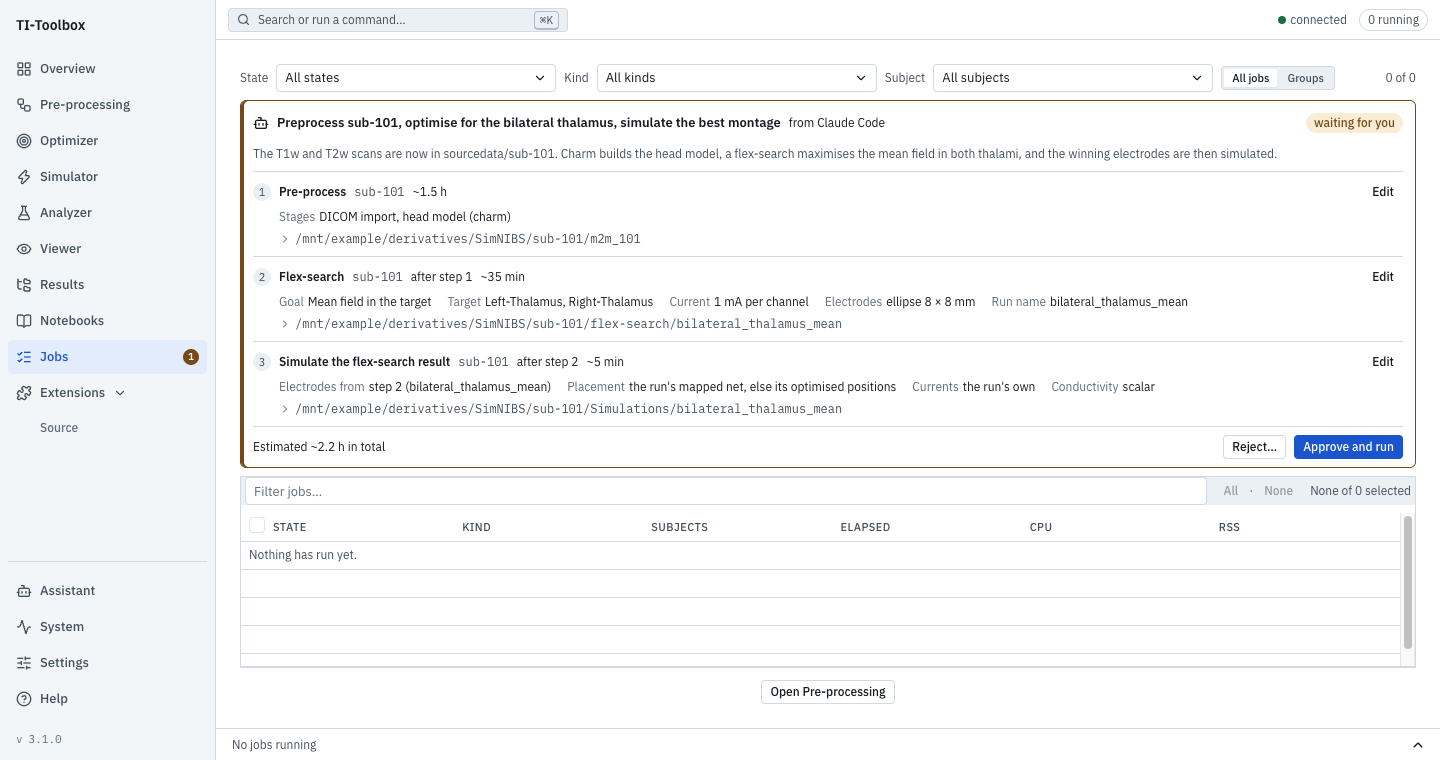 A plan from Claude Code waiting for approval on the Jobs page.
- Update notifications. The app’s version is always shown at the bottom of the side bar. When a newer release is out, the app tells you at start-up, and Settings ▸ Updates shows whether you’re up to date. Nothing is downloaded or installed for you.
- Carrier-only control simulations (ΔF = 0). Tick Job settings ▸ Output fields ▸
Carrier-only control, or pass
SimulationConfig(carrier_only=True, output_fields=["hf_peak", "hf_sar"]). Both pairs then run at the same frequency and in phase, with no beat:hf_peakis|E1+E2|andhf_saris|E1+E2|²(Cassarà 2025 Part II). Only 2-pair TI is supported. See Carrier-only control.
Changed
- fsaverage projections are viewable
.mshsurfaces (…_space-fsaverage<N>_fields.msh) that open in the Viewer or Gmsh, and surface cluster-permutation results are nowsurface_stats.mshplus CSV tables (null_distribution.csv,cluster_subject_values.csv).- Who is affected: anyone with fsaverage projections or surface cluster-permutation results
from v3.0.x or earlier. Older
_fields.npzandsurface_maps.npzfiles are no longer read; a surface analysis over old projections stops before it starts and names the missing.msh. - What to do: re-run Map fields to fsaverage for those simulations, then the surface analysis. The old files stay on disk; statistics are unchanged.
- Who is affected: anyone with fsaverage projections or surface cluster-permutation results
from v3.0.x or earlier. Older
Fixed
- Windows: FreeSurfer no longer stops at once with “LOCAL_PROJECT_DIR must be an absolute host
path”; FreeSurfer, QSIPrep and QSIRecon accept a native Windows project path. Saved Viewer scenes
use Windows paths correctly. The agent plugin finds your Python on Windows (marketplace
installs: run
setx TIT_PYTHON pyonce). - MNI atlases: regions of the Glasser, Schaefer and MASSP MNI atlases had FreeSurfer’s names. They now carry each atlas’s own names. Label numbers, and so saved targets, are unchanged.
- Flex-search results: a Simulator Flex result row starts with the run’s own currents (its optimised split, when the run searched one) instead of 1 mA per channel.
- Reports: flex-search and ex-search reports no longer fail for a target picked on a cortical
atlas (
.annot). - Outputs: a job can no longer write its results outside the project folder.
- Atlas lists: an open atlas list in a target editor no longer closes when a job finishes.
The full list is in the Changelog.
Updated 2026-10-12
These fixes were delivered in an updated v3.1.0 image on October 12, 2026; there is no new release. If you already installed v3.1.0, quit TI-Toolbox and open it again (with an internet connection): it downloads the refreshed image on start. You do not need to download a new release.
- DWI reverse phase-encoding fieldmaps placed in
sourcedata/sub-<id>/fmap/are converted to BIDSfmap/sub-<id>_dir-PA_epiwithIntendedFor, so QSIPrep can correct the DWI. - Adaptive and Multi-threshold focality flex-search no longer fails with “Please define TESoptimize.threshold”.
- The skin-visualization EEG net picked from the list is found.
Download Links
Desktop App (v3.1.0): macOS Intel · macOS Apple Silicon · Windows · Linux AppImage · Linux deb
Other:
- Docker Image:
docker pull --platform linux/amd64 idossha/ti-toolbox:v3.1.0 - Source Code: GitHub Repository
For installation instructions, see the Installation Guide.
Getting Help
See Troubleshooting for known issues, or GitHub Discussions for help.