Release v3.0.2
Release Date: September 28, 2026
A patch release for everyone on v3.0.x. Install the new desktop app; it downloads the matching
image (idossha/ti-toolbox:v3.0.2) on its next start. Update both together: the image carries the
new DTI fit (it adds DIPY) and the server the app talks to. Projects, saved scenes and results from
v3.0.1 open unchanged, but anisotropic (DTI) simulations need a re-run (see the first item).
Highlights
- DTI conductivity tensors are placed and oriented correctly. The tensor TI-Toolbox wrote into
m2m_<id>/DTI_coregT1_tensor.nii.gzwas aligned to the head model by a shift only, although QSIPrep’s space is also rotated (about 21° on the test subject), and the tensors were not rotated with it. On the test subject they sat 18 mm off on average, with a 38° median error in fibre direction. Extract DTI tensor now fits the tensor itself with DIPY from QSIPrep output and maps it with QSIPrep’s exact transforms, rotating every tensor. A quality gate refuses to write a tensor that fails its checks and records the result inDTI_coregT1_qc.json.- Who is affected: simulations using the
vn,dirormcconductivity model, run with v2.3.0 through v3.0.1. Isotropic (scalar) results are unchanged. - What to do: run Pre-processing ▸ Extract DTI tensor again with Replace and rerun, then re-run those simulations. Your existing QSIPrep output is reused; QSIPrep does not need to run again.
- Who is affected: simulations using the
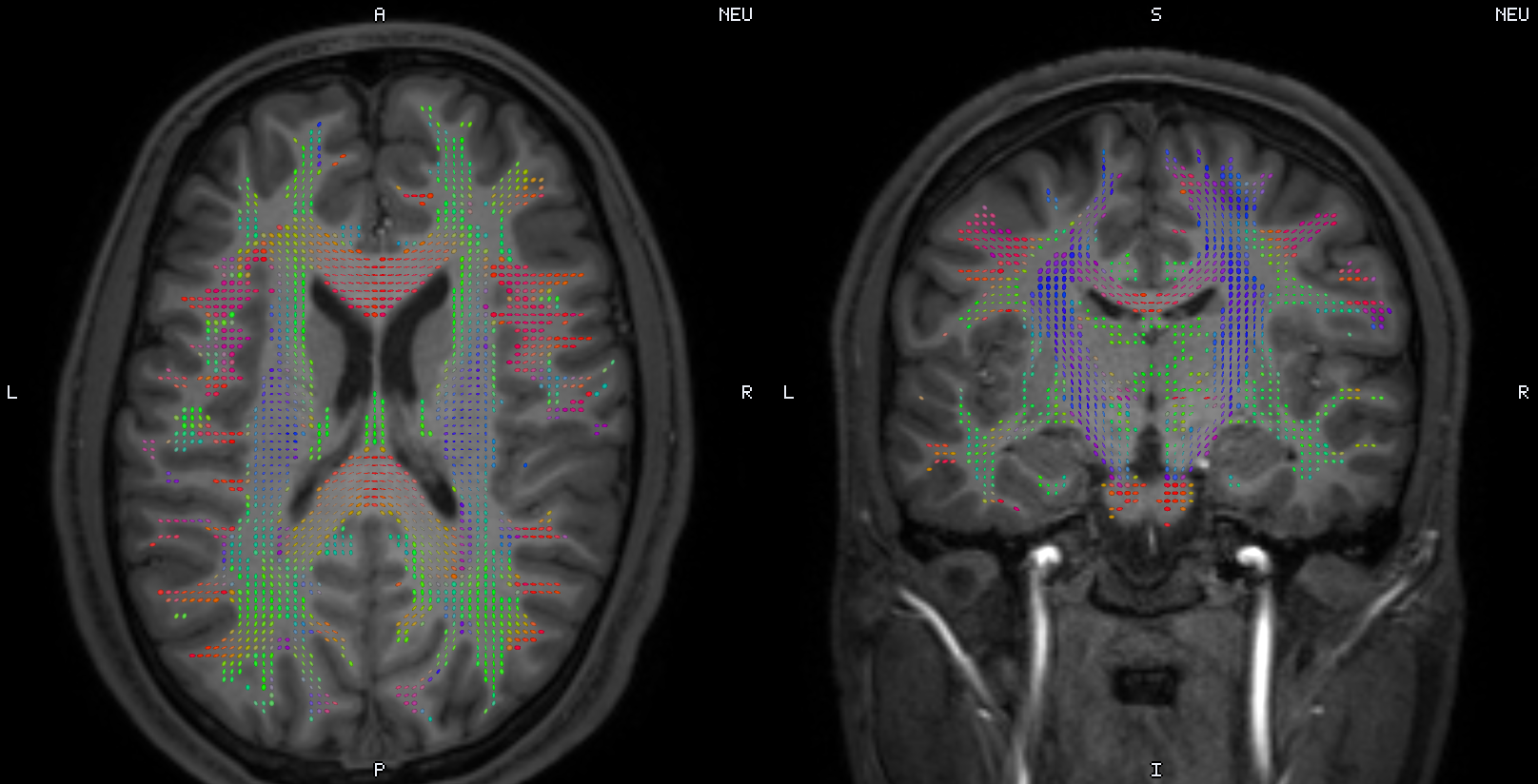 The test subject Ernie's T1 with the corrected DTI tensor, in TetraVox.
- QSIRecon is optional. Extract DTI tensor now runs straight after QSIPrep (and charm).
QSIRecon is only needed for tractography, scalar maps or connectivity. QSIPrep also picks its
settings from your data: distortion correction is always on (TOPUP with a reverse phase-encoding
fieldmap, otherwise fieldmap-less SyN), unringing is
rpgfor partial-Fourier data andmrdegibbsotherwise, and output stays at the DWI’s native resolution. Every option remains in Configure QSIPrep. On Apple Silicon, QSIPrep now refuses to start instead of failing an hour in at SynthSeg, and explains how to run it on an x86-64 Linux or Windows machine and bring the output back; the DTI step itself runs anywhere. - New reports: lean, cited, offline, and in the app’s theme. Every simulation writes a Simulation report (envelope in grey matter, where its maximum is, the montage on the EEG cap, three slices through the hot spot). The Flex-search report names the target, says what the score means in words (“target mean 1.82× the background mean”) and is about 0.3 MB instead of 7.4 MB. Ex-search now writes a report: the winning montage on the cap, every montage in one chart, and a sortable top 25. The DTI QC report is redesigned around one cited gate and is written even when the gate fails. The head-model report is SimNIBS’s own charm report, copied into the subject’s reports. All are under Results ▸ sub-… and on the job in Jobs.
Also fixed
- Head-model creation (charm) could freeze indefinitely on machines with many CPU cores (an OpenBLAS threading deadlock). It now finishes.
Removed (script users)
- The combined preprocessing report (
pre_processing_report_*.html) and thereportjob kind. Reports already on disk stay listed in Results. - The report-building classes in
tit.reporting(SimulationReportGenerator,FlexSearchReportGenerator,ReportAssembler, the reportlets,PreprocessingReportGenerator,create_preprocessing_report), print layouts for reports, andtit.plotting.generate_static_overlay_images. To rebuild a report from existing outputs, usetit.reporting.generators.<name>orsimnibs_python -m tit.reporting.generators.<name>(simulation,flex_search,ex_search,dti_qc).
The full list is in the Changelog.
Download Links
Desktop App (v3.0.2): macOS Intel · macOS Apple Silicon · Windows · Linux AppImage · Linux deb
Other:
- Docker Image:
docker pull --platform linux/amd64 idossha/ti-toolbox:v3.0.2 - Source Code: GitHub Repository
For installation instructions, see the Installation Guide.
Getting Help
See Troubleshooting for known issues, or GitHub Discussions for help.