The panes
The crosshair is one point in space and every pane shows it. Move it and all the panes follow.
| Left-click / drag in a 2D pane | move the crosshair. It never pans the image |
| Wheel | step one slice |
| ⌘/Ctrl + wheel, or a trackpad pinch | zoom about the pointer |
| Middle-drag, Space + drag, or a two-finger trackpad drag | pan |
| Right-drag | window / level on the active layer |
| Shift + drag | the active layer's opacity |
| Arrows | nudge the crosshair in the plane · PgUp / PgDn step slices |
| In the 3D pane: left-drag orbits, right-drag pans, wheel dollies, double-click puts the crosshair on what you clicked |
x cycles the pane layout (1+3, 2×2, single pane, …); r resets the active view, or Alt + double-click. Zoom is per pane: + / - zoom about the pane centre. Zoom is real resampling of the volume, not a scaled bitmap — the detail view below is the same slice at 0.12 mm per pixel.
Every 2D pane carries orientation letters on all four edges, a corner block (view, slice index, world RAS) and a persistent RAD / NEU badge — the neurological/radiological convention is never implicit. The Scale toggle adds a scale bar in millimetres, and Cube adds an orientation cube to the 3D pane whose faces you can click to snap the camera (also 1–6 for A/P/L/R/S/I). Toggle the radiological convention from the toolbar; it mirrors the image about the vertical axis and nothing else — the badge says which you are in, always.
o toggles orthographic projection in the 3D pane, c toggles the crosshair, Home resets every pane and sends the cursor to world origin.
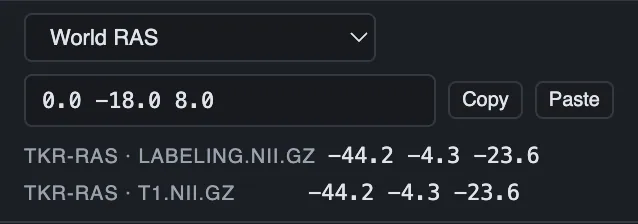
The info panel near the coordinate bar has two blocks with the same rows: Cursor (the last click, it stays) and Mouse (live). Each names its layer and gives the voxel index and value, the region name, or the element id, tissue tag and every field value at that point.