sEEG contacts
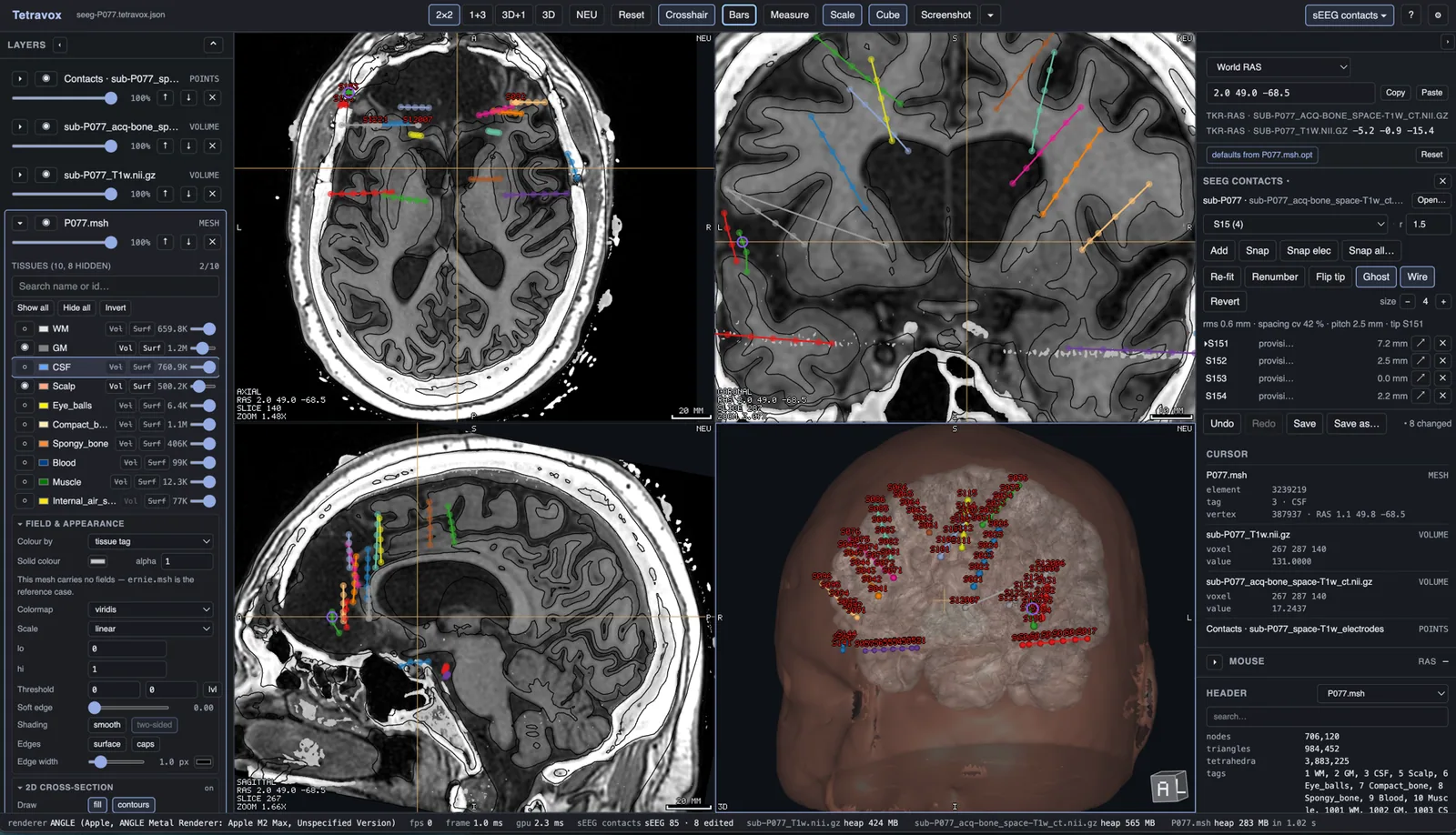
The flagship Tetravox extension. tetravox.seeg is a contact editor for stereo-EEG depth electrodes: it localises and hand-corrects sEEG contacts on a registered CT and writes a corrected BIDS electrodes.tsv back — reversibly, with a timestamped backup and a provenance sidecar. It is a port of the 3D Slicer SEEG Contact Editor (seegprep's slicer/SEEGContactEditor) into Tetravox's own panes, and it reads and writes the same files, so the two can be used on the same subject interchangeably.
What it does
Open the registered CT and the BIDS electrodes table that was localised on it, fix what the localiser got wrong, and save. Every contact is drawn in its electrode's own colour — the dot, the shaft line and the name — so on a many-shaft implant you can tell at a glance which contact belongs to which lead. On load the CT is set the Slicer way (grey, opaque, everything below 150 HU hidden) so soft tissue drops away and bone and metal are what you edit against.
Nothing renumbers your table behind your back: loading, placing, dragging, snapping and deleting all leave every contact's number and name exactly as they were. Only Re-fit and Renumber tip-first relabel, and both say so on the button — a clinical table's numbering is wired to the recording system through its csc column.
The workflow
- Open a subject. Drop or Open… the registered CT (
derivatives/seegprep/sub-<id>/ct/…_ct.nii.gz) or its electrodes table (derivatives/seegprep/sub-<id>/ieeg/…_electrodes.tsv) and the panel finds the other beside it, along with the_coordsystem.json, any existing_editlog.json, and the subject's T1. The reader is forgiving about delimiters and column names, and a 3D Slicer.fcsvworks too. - Place, select and drag. While the panel is open, clicking a contact selects it — the electrode dropdown, the crosshair and every pane follow. Drag a contact in a 2D pane to move it; Add (
a) drops new contacts on the chosen electrode;n/pwalk the shaft. - Correct the shaft. Snap (
s,⇧Sfor the whole electrode, Snap all… for every one) moves a contact to the intensity-weighted peak of the metal it sits in. Re-fit (f) fits a line through a shaft's contacts, re-spaces them at the median gap and relabels from the tip. Renumber tip-first and Flip tip (t) set which end is contact 1. Ghost (g) draws off-slice contacts faintly, Wire (d) draws the shaft lines, and size − / + sets the contact size — all three are saved with the scene. Undo / redo isz/⇧Z. - Save. Save writes the table back over the file it came from (Save as… picks a new one). In one step it copies the previous table to
<name>.<YYYYMMDD-HHMMSS>.bak, writes the tsv (your original columns in their original order, withelectrode,contactandstatusappended), and writes a<stem>_editlog.jsonrecording exactly what changed. That editlog is what letsseegprepknow a subject was hand-edited. ⌘S saves the scene, not the table; the panel says so when contacts are unsaved.
How to get it
Open File ▸ Extensions…, find sEEG contacts, Download & enable, and read the permission sheet — like every extension, it is downloaded, never shipped inside the application, and nothing runs until you have agreed to what its manifest declares. Its two files (index.js and manifest.json) are checked against the catalogue's SHA-256 as they download, recorded in a receipt beside them, and re-hashed against that receipt at every enable — before a byte of it runs.
Links
- Source repository — idossha/tetravox-seeg
- Latest release — tetravox-seeg releases
- Step-by-step usage — the sEEG contacts wiki page