Tissue Analyzer
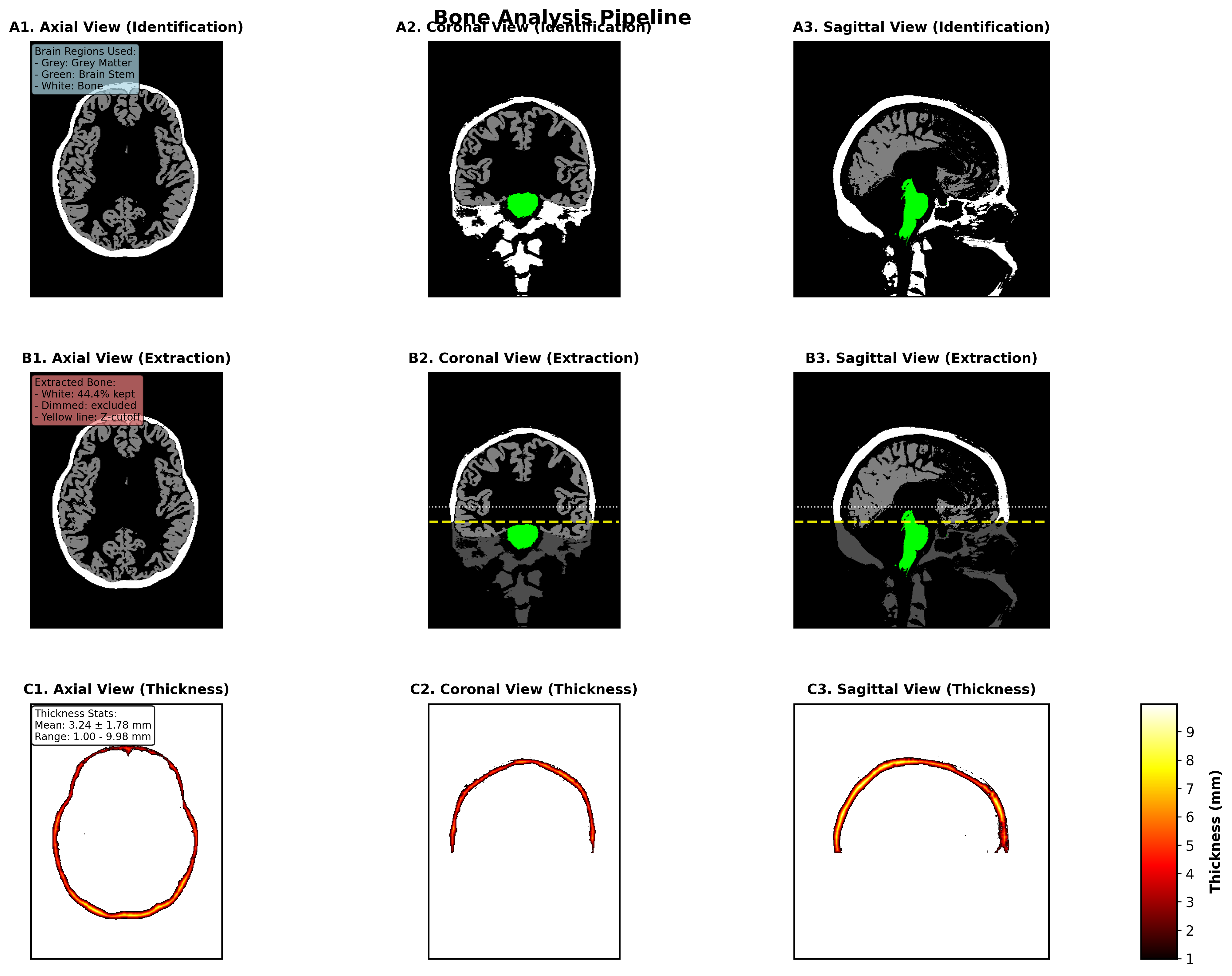
The Tissue Analyzer extension provides volumetric assessment f different tissue types from segmented NIfTI data. This tool supports analysis of cerebrospinal fluid (CSF), bone, and skin tissues with automated volume and thickness calculations.
Key Features
- Multi-Tissue Support: Analyze CSF, bone, and skin tissues.
- Volume Calculations: Automatic volume measurements based on labeled voxel data in subject space
- 3D Thickness Analysis: Distance transform-based thickness calculations with statistical summaries (experimental)
- Publication-Quality Visualizations: High-resolution figures for axial, coronal, and sagittal views
Analysis Pipeline
1. Tissue Identification
- Load segmented NIfTI data from SimNIBS derivatives
- Extract tissue masks using configured label numbers
- Load label names from labeling_LUT.txt for human-readable output
2. Spatial Filtering
- Identify brain reference regions (cortex and brainstem)
- Apply 3D bounding box with configurable padding
- Filter out lower anatomy using Z-coordinate thresholds
- Focus analysis on relevant anatomical regions
3. Analysis
- Calculate total tissue volume / thickness (experimental)
- Account for voxel dimensions from NIfTI header
- Provide voxel count statistics
Calculation Methodology
Volume Calculation Methodology
Volume is calculated by multiplying the number of tissue voxels by the volume of each voxel:
Volume (mm³) = Number of tissue voxels × Voxel volume
Where:
- Number of tissue voxels: Count of all voxels in the filtered tissue mask
- Voxel volume: Product of voxel dimensions from the NIfTI header (
voxel_dim_x × voxel_dim_y × voxel_dim_z)
The voxel dimensions are extracted from the NIfTI header using header.get_zooms()[:3], which provides the spatial resolution in millimeters for each dimension. This ensures accurate volume measurements regardless of the scan resolution.
Thickness Calculation Methodology
Thickness is calculated using a 3D Euclidean distance transform:
1. Distance transform: Calculate distance from each tissue voxel to nearest boundary (background)
2. Thickness = Distance × 2
The algorithm uses scipy’s distance_transform_edt() with voxel spacing sampling to account for anisotropic voxel dimensions. For each voxel within the tissue mask, the distance to the nearest boundary is computed. The thickness at each point is then defined as twice this distance, representing the full thickness of the tissue structure at that location.
4. Visualization and Reporting
- Generate publication-quality figures
- Create comprehensive analysis reports
- Export results in multiple formats (PNG, PDF, text)
Output Files
Analysis Results
output_directory/
├── csf_analysis_summary.txt          # Comprehensive analysis report
├── csf_thickness_analysis.png        # Thickness visualization (PNG)
├── csf_thickness_analysis.pdf        # Thickness visualization (PDF)
├── csf_extraction_methodology.png    # Methodology illustration (PNG)
├── csf_extraction_methodology.pdf    # Methodology illustration (PDF)
├── csf_combined_publication_figure.png  # Combined analysis figure (PNG)
└── csf_combined_publication_figure.pdf  # Combined analysis figure (PDF)
Data Requirements
Input NIfTI Files
- Format: NIfTI (.nii or .nii.gz)
- Segmentation: Tissue labels from SimNIBS segmentation
- File: labeling_LUT.txt (optional but recommended)
- Location: Same directory as NIfTI, or parent directories
Directory Structure
derivatives/
└── SimNIBS/
    └── sub-XX/
        └── m2m_sub-XX/
            ├── segmentation/
            │   ├── segmented.nii.gz     # Input segmentation
            │   └── labeling_LUT.txt     # Label mapping (optional)
            └── ...
Usage Workflow
Command Line Usage
# Basic CSF analysis
python tissue_analyzer.py /path/to/segmented.nii.gz -t csf

# Bone analysis with custom output directory
python tissue_analyzer.py /path/to/segmented.nii.gz -t bone -o bone_results

# Skin analysis with custom labels
python tissue_analyzer.py /path/to/segmented.nii.gz -t skin -l 511 512
Configuration Options
Tissue-Specific Parameters
TISSUE_CONFIGS = {
    'csf': {
        'name': 'CSF',
        'labels': [4, 5, 14, 15, 43, 44, 72, 24, 520],
        'padding': 40,           # voxels
        'color_scheme': 'Blues',
        'tissue_color': [0, 0, 1],
        'brain_labels': [3, 42, 16]
    },
    # ... additional tissue configurations
}
Custom Label Names
# Override or add label names manually
custom_labels = {
    4: "Left-Lateral-Ventricle",
    5: "Left-Inf-Lat-Vent",
    511: "Skin"
}
analyzer.set_label_names(custom_labels)
Integration Notes
TI-Toolbox Structure
- Output Organization: Results organized under
derivatives/ti-toolbox/{tissue}_analysis/ - Logging Integration: Compatible with shared TI-toolbox logging utilities