Testing Pipeline
Overview
The TI-Toolbox uses a two-tier testing approach: a fast unit test suite (pytest, runs anywhere) and Docker-based integration tests (CircleCI). The unit test suite was rebuilt from scratch for v2.2.4 and runs 132 tests in under 0.3 seconds without Docker or any heavy dependencies.
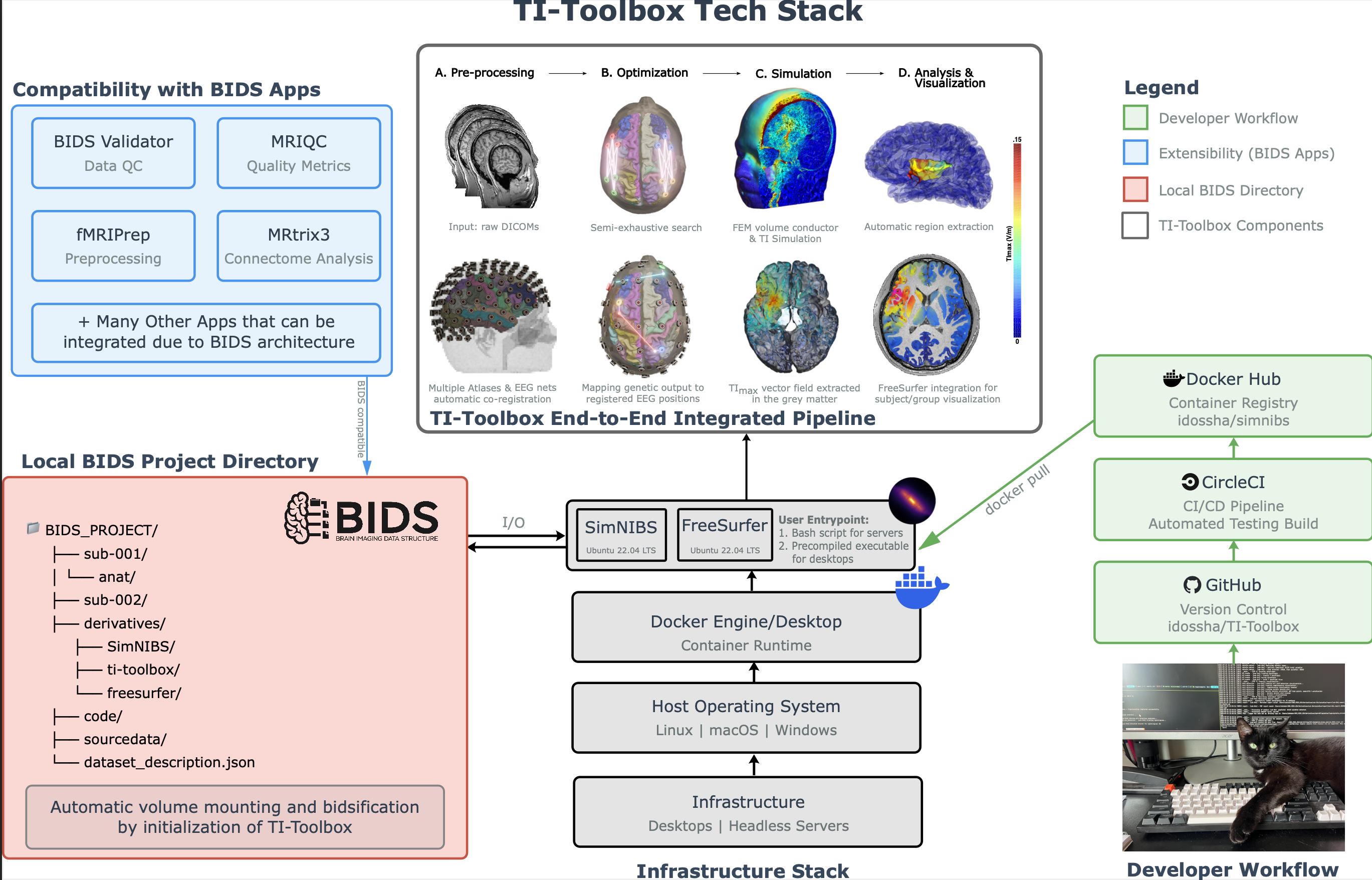
Complete TI-Toolbox Tech-stack
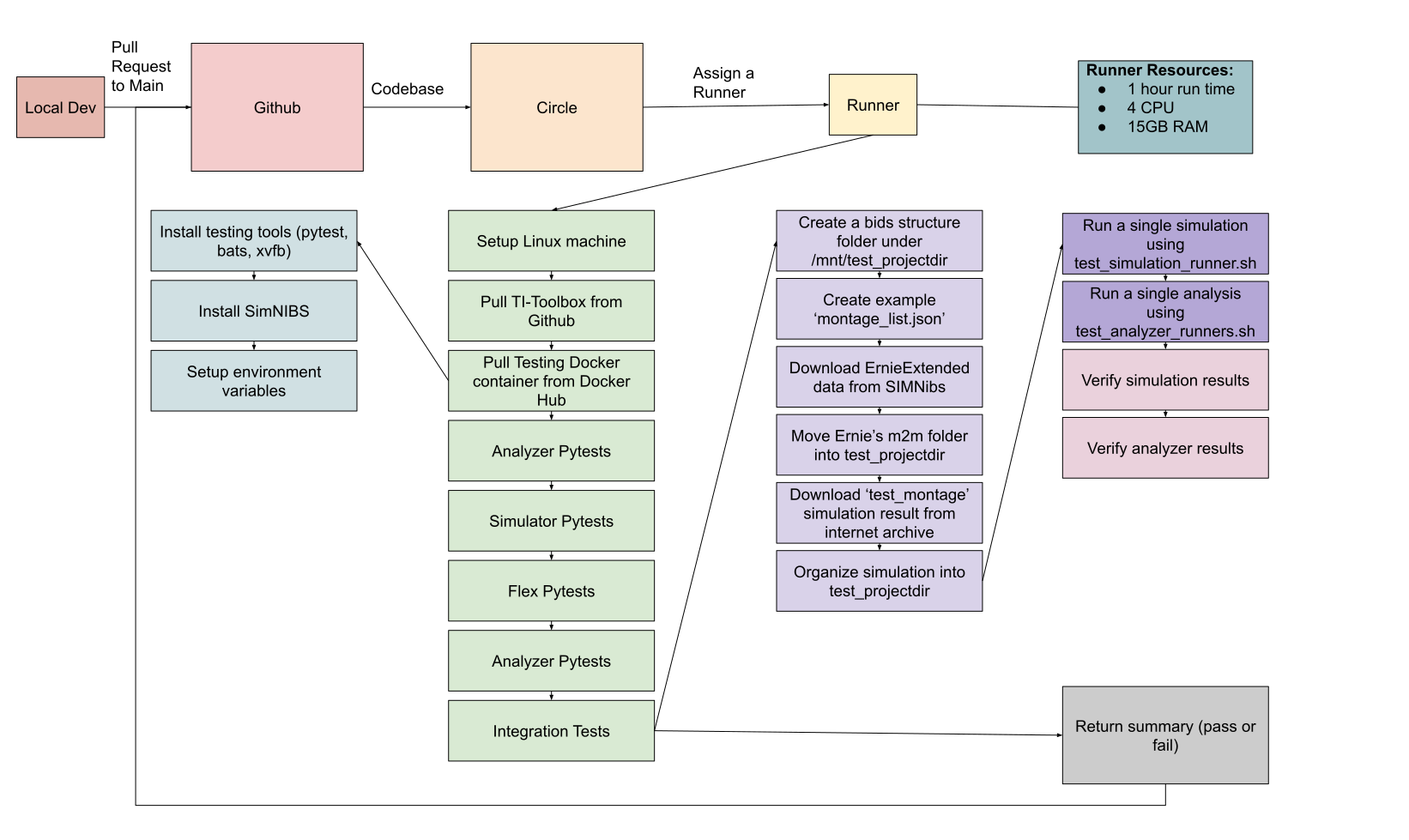
TI-Toolbox CI/CD Pipeline
Unit Test Suite (pytest)
At a Glance
- 132 tests, completes in ~0.28 seconds
- Runs on any machine with Python 3.9+ – no Docker, no SimNIBS, no GPU
- All heavy dependencies are mocked at import time via
conftest.py
Mocking Strategy (tests/conftest.py)
The test suite must run outside Docker where SimNIBS, FreeSurfer, and scientific libraries are unavailable. conftest.py uses pytest_configure() to inject MagicMock modules into sys.modules before any tit imports occur.
Mocked packages:
simnibs(includingsimulation.sim_struct,mesh_tools.mesh_io,utils.transformations)bpynumpy,numpy.linalgscipy(optimize,spatial,spatial.transform)nibabel,nibabel.freesurferh5pymatplotlib(pyplot,backends.backend_pdf,lines)pandas
The mock hierarchy is built so that dotted imports (e.g., from matplotlib.lines import Line2D) resolve correctly – child mocks are wired as attributes of their parent mocks.
Key Fixtures
| Fixture | Scope | Purpose |
|---|---|---|
_reset_path_manager |
autouse (every test) | Resets the PathManager singleton after each test to prevent cross-test contamination |
tmp_project |
function | Creates a minimal BIDS-compliant directory tree under tmp_path |
init_pm |
function | Initializes a PathManager pointed at tmp_project |
The tmp_project fixture creates this layout:
tmp_path/
├── sub-001/anat/
├── derivatives/
│   ├── SimNIBS/sub-001/m2m_001/segmentation/
│   ├── SimNIBS/sub-001/Simulations/
│   ├── freesurfer/sub-001/
│   └── ti-toolbox/
├── code/ti-toolbox/config/
└── sourcedata/
Coverage Areas
| Test file | What it covers |
|---|---|
test_constants.py |
Tissue tag maps, field type enums |
test_paths.py |
PathManager singleton, BIDS path resolution |
test_sim_config.py |
SimulationConfig, montage dataclasses, conductivity types |
test_opt_config.py |
FlexConfig, ExConfig, ROI and electrode dataclasses |
test_analyzer.py |
Analyzer initialization, analysis dispatch |
test_stats_config.py |
GroupComparisonConfig, permutation settings |
test_config_io.py |
JSON serialization round-trips, _type discriminators |
test_pre.py |
Preprocessing pipeline configuration |
test_flex_manifest.py |
Flex-search manifest parsing |
test_gui_imports.py |
GUI module import hygiene (no crashes outside Docker) |
test_scripts.py |
Script entry-point validation |
test_integration.py |
Cross-module integration paths |
Running Tests Locally
# From the repository root
./tests/test.sh

# Or directly with pytest
pytest tests/ -v
No Docker required. No environment variables needed. The conftest mocking handles everything.
CI/CD (CircleCI)
What is CircleCI?
CircleCI is a continuous integration platform that automatically runs the test suite on every pull request. For the TI-Toolbox, CircleCI:
- Automatically triggers on every pull request to the main branch
- Uses static test image –
idossha/ti-toolbox-test:latest - Runs the pytest suite inside the container
- Provides detailed reports on test results and artifacts
Pipeline Configuration
The testing pipeline is configured in .circleci/config.yml:
- Executor: Ubuntu 22.04 VM with Docker
- Pull Requests: Tests automatically run on all branches when a PR is created/updated
- Direct Commits: Tests do NOT run on direct commits to
mainormaster
TI-Toolbox Test Image
- Image:
idossha/ti-toolbox-test:latest - Contains: Ubuntu 22.04, SimNIBS 4.6, Python 3.11, all scientific packages, pytest
- No TI-Toolbox code – PR code is mounted at runtime
Test Execution Flow
Local:
./tests/test.sh
# Runs pytest directly -- fast, no Docker needed
CI/CD:
# CircleCI does:
# 1. Checkout PR code
# 2. Pull idossha/ti-toolbox-test:latest
# 3. Mount PR code into container
# 4. Run pytest inside container
# 5. Store artifacts and report results