Simulator
The Simulator module provides temporal interference (TI) simulation capabilities, supporting multiple montage sources, electrode configurations, and simulation parameters. It can be invoked programmatically via run_simulation() or through a JSON config entrypoint.
User Interface
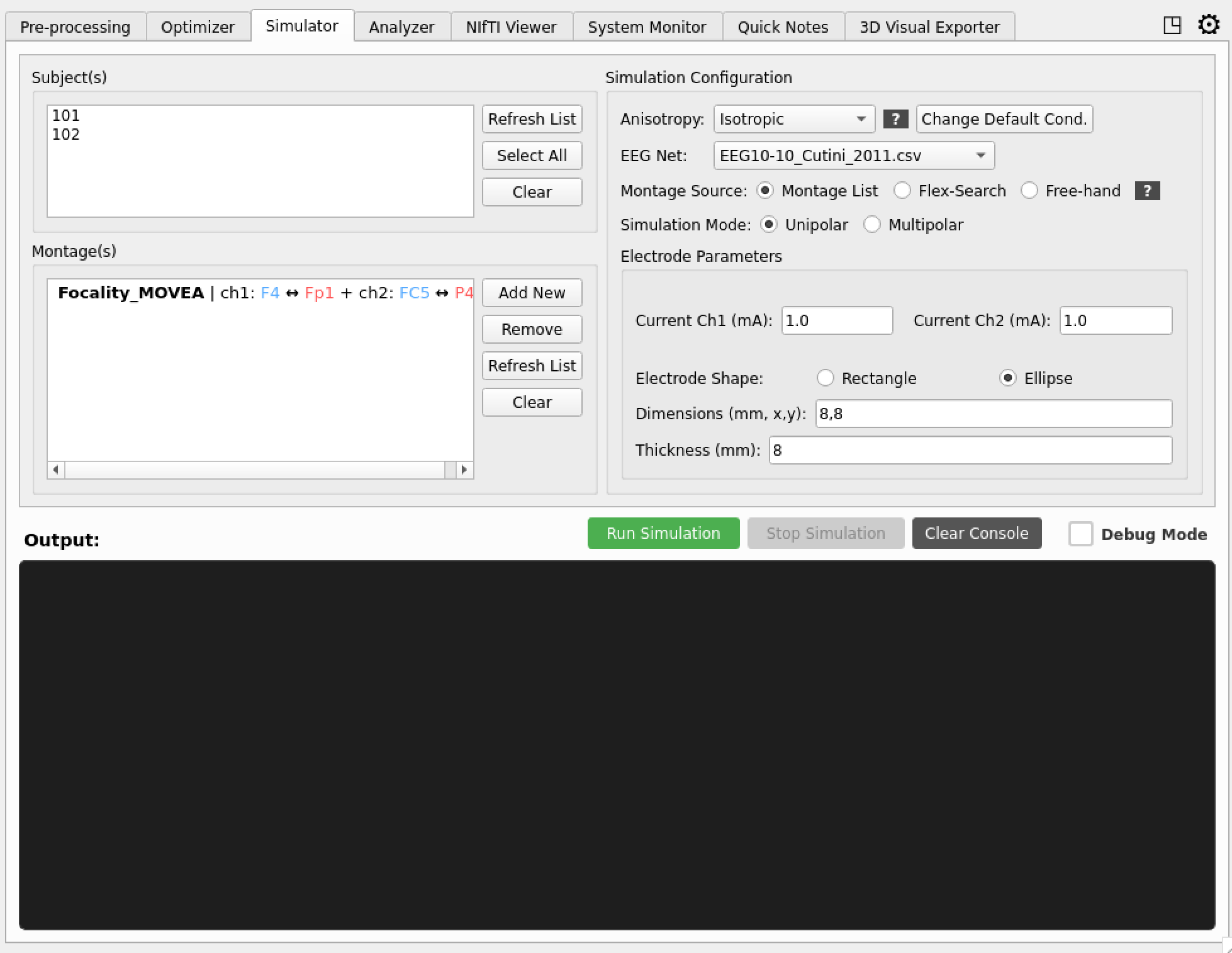
The simulator GUI provides intuitive controls for all simulation parameters:
Main Controls
- Subject Selection: Choose from available pre-processed subjects
- Montage Source: Radio buttons for montage list, flex mode, and free-hand
- Simulation Mode: Unipolar/multipolar selection with current inputs
- EEG Net: Dropdown selection of available electrode configurations
Advanced Options
- Conductivity Model: Four anisotropy types (
scalar,vn,dir,mc) with configurable bounds - Current Configuration: Individual per-pair electrode current settings
- Batch Processing: Multiple subject simulation queues
Output Management
- Real-time Logging: Simulation progress and status updates
- Result Visualization: Automatic generation of field maps and statistics
- Data Export: NIfTI files, electrode positions, and analysis reports
Conductivity Types
The conductivity field on SimulationConfig controls tissue conductivity modeling:
| Type | Code | Description |
|---|---|---|
| Scalar | scalar |
Isotropic, piecewise-constant (default, no DTI needed) |
| Volume Normalized | vn |
Normalized tensors scaled by tissue conductivity |
| Direct | dir |
Direct linear rescaling of diffusion tensor eigenvalues |
| Mean Conductivity | mc |
Isotropic but spatially varying, from tensor volumes |
Additional parameters aniso_maxratio (default: 10.0) and aniso_maxcond (default: 2.0) on SimulationConfig control the anisotropy bounds.
Montage Sources
The simulator supports three primary montage source types:
1. Montage List
Pre-defined electrode configurations organized by EEG net and stimulation mode:
- Unipolar Montages: The traditiona two pairs electrode montage
- Multipolar Montages: Multiple (currently only supporting four) pairs for higher focality
- EEG Net Compatibility: Automatically filtered based on selected electrode configuration
- Management: Add, remove, and refresh montage collections
2. Flex Mode
Automatic integration with the flex-search optimizer.
- Optimize: Start by running the optimizer based on your needs
- Simulate: Move to the simulator and use the automatic montage available from the flex-search
3. Free-Hand
Mode that allows exploration of untraditional montages
- Flexible Positioning: Manual electrode placement for specialized protocols
- Extension: Open up the
electrode placementextension to freely place electrodes on subjects
Simulation Modes
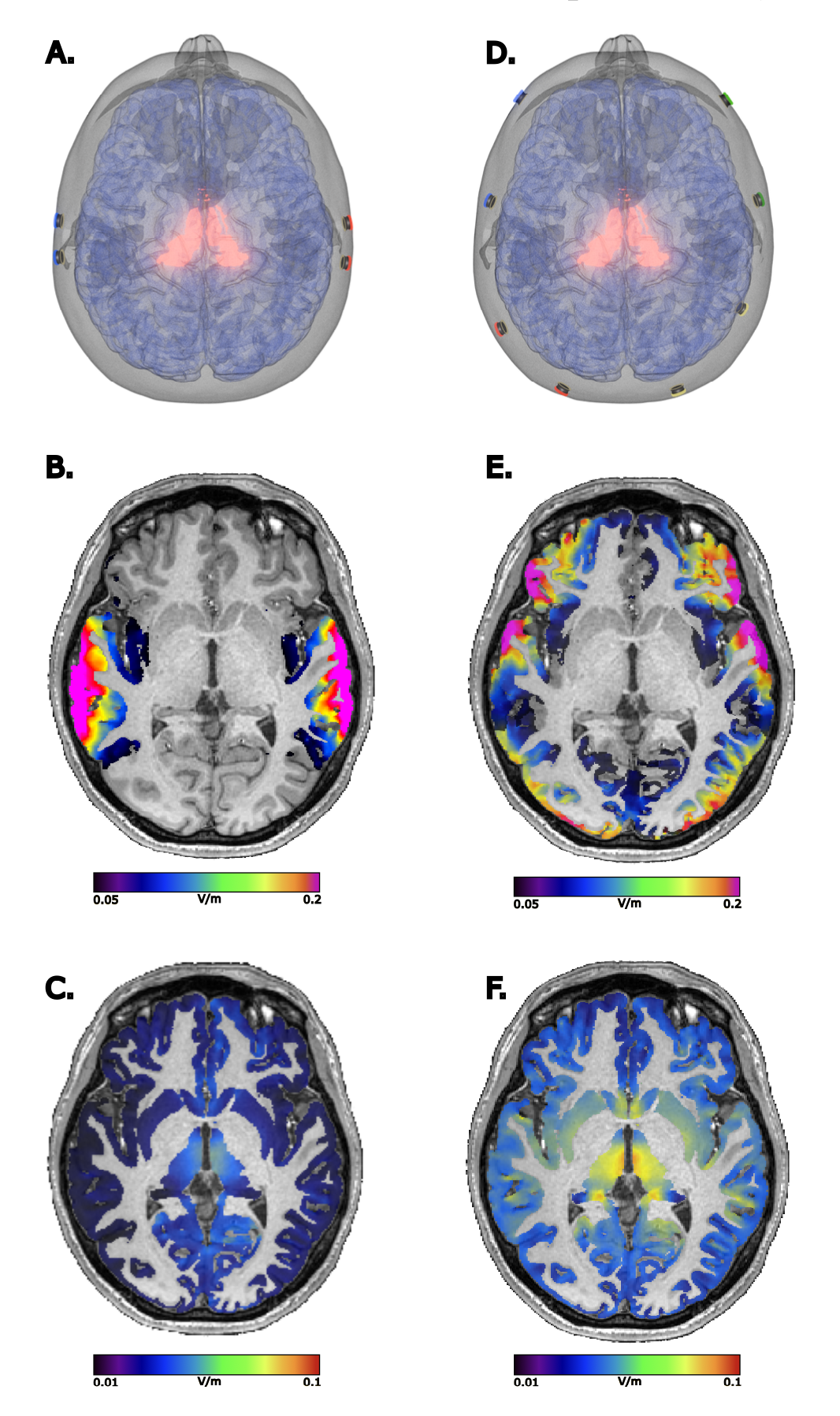 Left column unipolar (two channels) right column multipolar (four channels). Panels A,D: target and electrode montage. Panels B,E: high frequency fields. Panels C,F: modulation fields.
Unipolar Mode
- Configuration: Single active electrode with dedicated return path
- Current Settings: Two current inputs (active and return electrodes)
- Applications: Focal stimulation with clear current flow direction
- Montage Compatibility: Works with unipolar montage collections
Multipolar Mode
- Configuration: Multiple active electrodes (up to 4 channels)
- Current Settings: Four current inputs for complex stimulation patterns
- Applications: Distributed stimulation, field steering, and complex targeting
- Montage Compatibility: Works with multipolar montage collections
Available EEG Nets
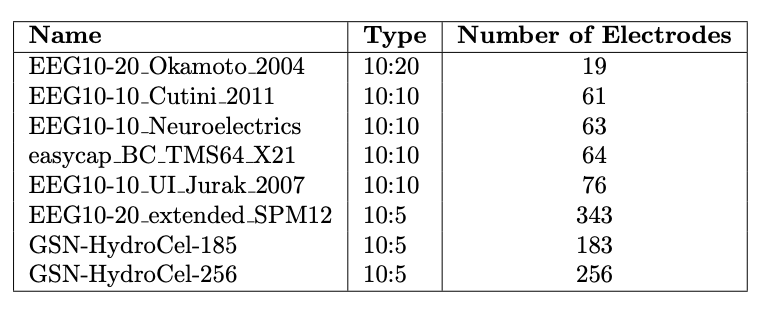
The TI-Toolbox automatically co-registers the following EEG electrode nets to head models during preprocessing. These pre-aligned nets enable seamless integration with simulation workflows, electrode optimization, and leadfield calculations.
Automatic Co-registration Benefits
- Seamless Integration: no manual registration steps
- Simulation Ready: Instant compatibility with TI field simulation workflows
- Optimization Support: Direct integration with flex-search tools
- Leadfield Generation: all avilable for leadfield matrix creation
Net Detection and Management
- Automatic Scanning: Searches
eeg_positions/directories for available electrode configurations - Dynamic Updates: Montage lists automatically refresh based on selected EEG net
- Compatibility Filtering: Only compatible montages are displayed for the selected electrode configuration
Anisotropy
The simulator supports four tissue conductivity models via the conductivity string field on SimulationConfig, configurable both through the GUI and programmatic API.
Isotropic Model (scalar)
- Description: Uniform conductivity in all directions
- Applications: Simplified modeling, faster computation
- Default: Used when no DTI data is available
Anisotropic Models (vn, dir, mc)
- Description: Direction-dependent conductivity based on DTI data
- Requirements: Diffusion tensor imaging (DTI) data processed through QSIPrep/QSIRecon
- Applications: More realistic modeling of white matter tracts
- Processing: Accounts for fiber orientation in field calculations
The anisotropy type is set via SimulationConfig.conductivity (or in the GUI dropdown). Two additional parameters control bounds:
aniso_maxratio(default: 10.0) – maximum ratio between eigenvaluesaniso_maxcond(default: 2.0) – maximum conductivity value
DTI Data Preparation
The TI-Toolbox provides integrated DTI processing via QSIPrep and QSIRecon. The pipeline extracts diffusion tensors and converts them to the format required by SimNIBS.
Required Files
For anisotropic simulation, the following file must exist in the m2m directory:
derivatives/SimNIBS/sub-{id}/m2m_{id}/
└── DTI_coregT1_tensor.nii.gz    # 4D tensor (X, Y, Z, 6)
For complete DTI processing instructions, see the Diffusion Processing documentation.
DTI Eigen Vectors Visualization
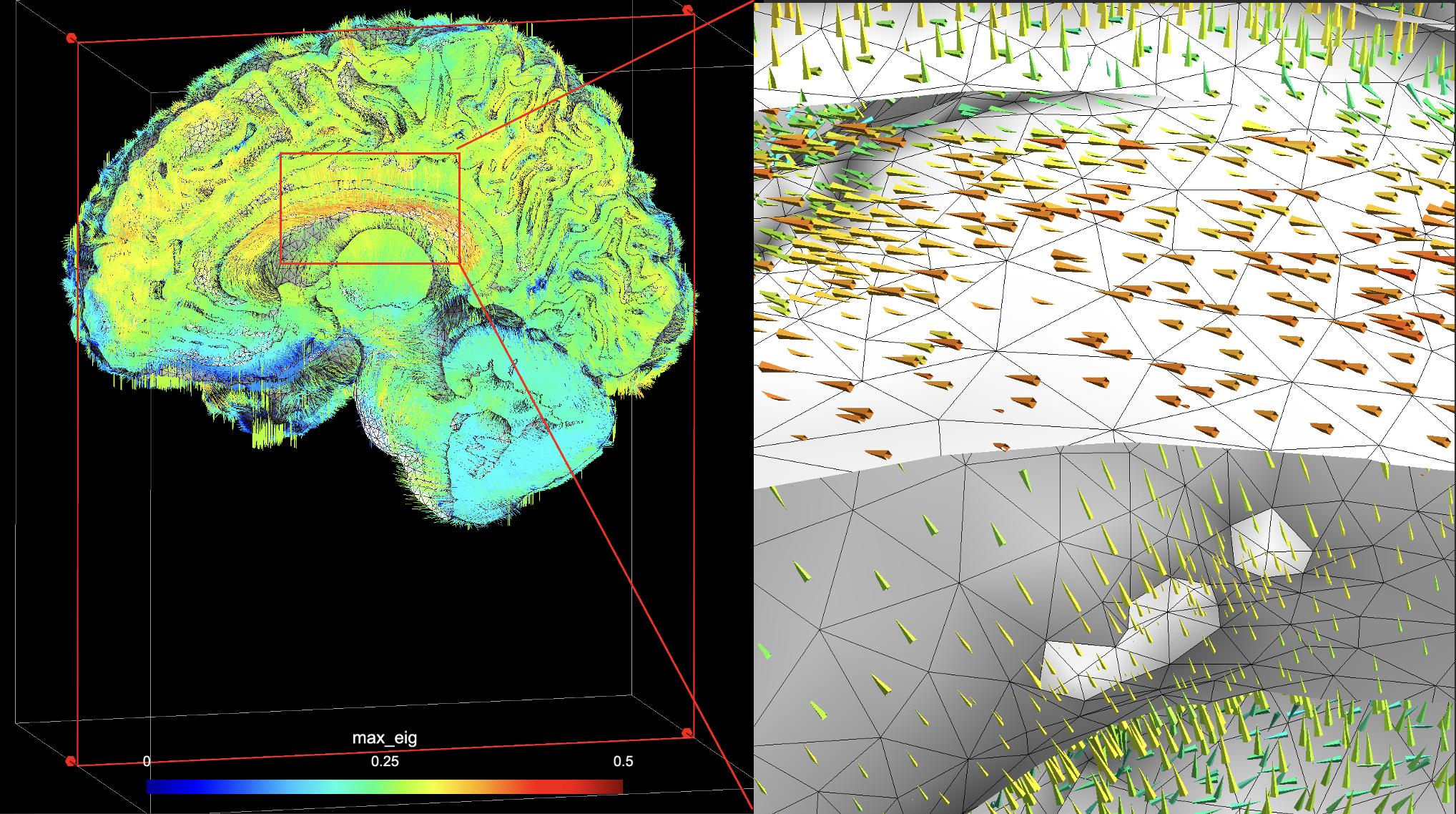
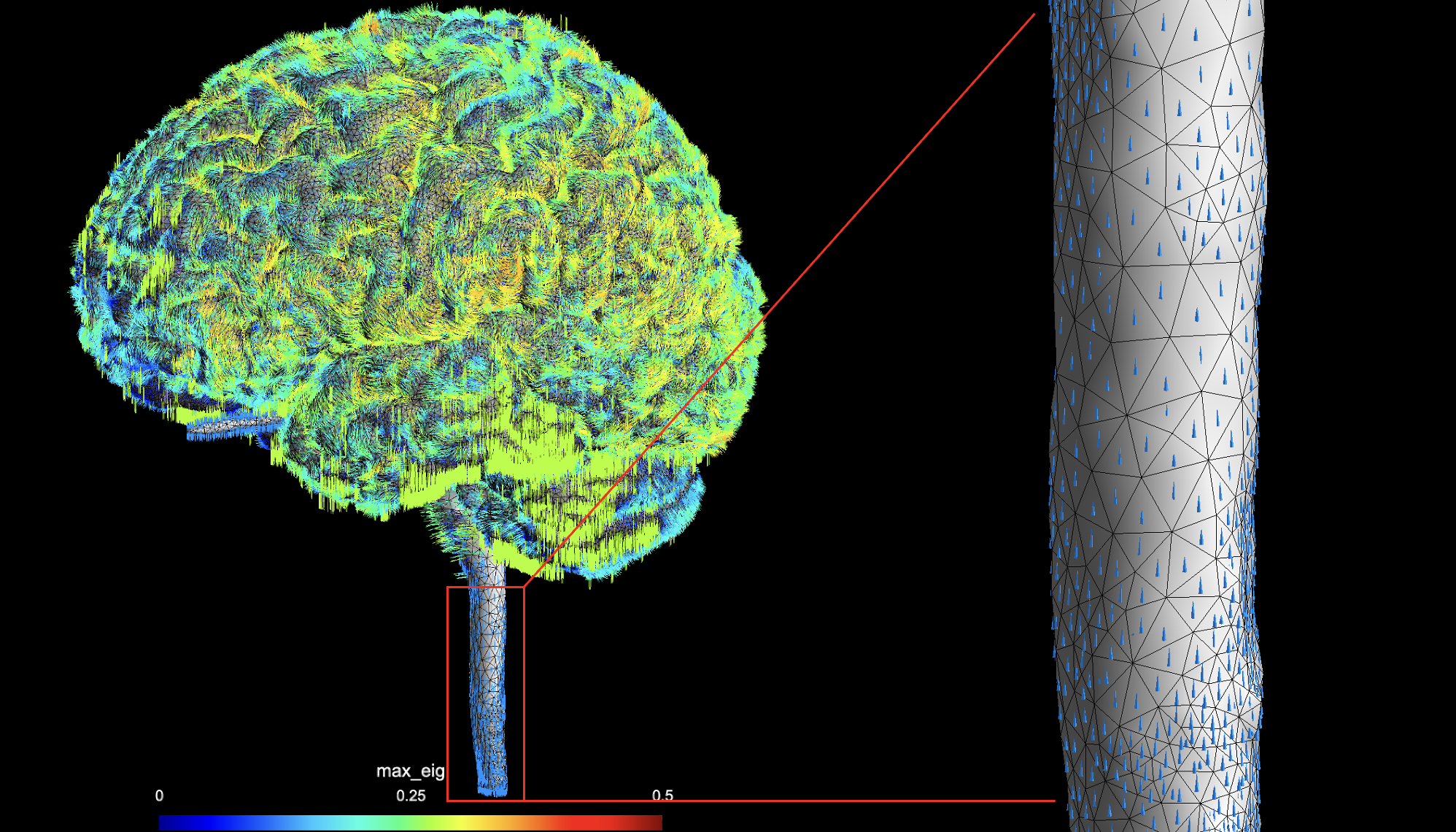
Gmsh visualizations showing white and gray matter with overlaid eigen vectors that scale conductivity in anisotropic simulations. Top: Corpus callosum region showing organized fiber directions. Bottom: Spinal cord region with longitudinal fiber orientation.
These visualizations display the principal diffusion directions (eigen vectors) derived from diffusion tensor imaging (DTI) data, which are used to create direction-dependent conductivity tensors in anisotropic tissue modeling.
For additional details on DTI processing theory, see the SimNIBS dwi2cond documentation.
Coordinate Spaces
Subject Space
- Definition: Coordinates relative to individual subject anatomy
- Origin: Centered on subject’s brain anatomy
- Applications: Subject-specific targeting and analysis
- File Format: Native FreeSurfer subject space coordinates
MNI Space
- Definition: Standardized coordinate system (MNI152 template)
- Origin: Based on Montreal Neurological Institute template
- Applications: Cross-subject comparisons and group analysis
- Transformations: Automatic conversion between subject and MNI space
Space Transformations
- Automatic Conversion: Built-in coordinate transformation utilities
- ROI Mapping: Support for both subject and MNI coordinate inputs
- Visualization: Compatible with both coordinate systems for analysis