Electrode Placement
The Electrode Placement extension provides an interactive 3D tool for freely placing electrode on head surfaces. This tool is designed for precise and flexible electrode positioning and is heavily inspired by SimNIBS’s GUI apporach.
Key Features
- 3D Surface Visualization: Fast loading and rendering of head surfaces from SimNIBS m2m directories
- Interactive Placement: Double-click to place electrode markers directly on the 3D surface
- EEG Cap Integration: Load and visualize EEG electrode positions from CSV files
- Color-Coded Pairs: Automatic electrode pair coloring (E1±, E2±, E3±, etc.) for easy identification
- Real-time Editing: Modify electrode coordinates numerically with live 3D updates
- Export Functionality: Save electrode configurations to JSON for stimulation planning
- OpenGL Rendering: Smooth 3D manipulation with rotation, zoom, and translation controls
Usage Workflow
Getting Started
- Launch Extension: Settings → Extensions → “Electrode Placement”
- Select Subject: Choose from available subjects in your project directory
- Load Surface: The extension automatically loads the head mesh from the subject’s m2m directory
- Optional: Load EEG Cap: Import reference electrode positions from CSV files
Electrode Placement
- Navigate: Use mouse controls to rotate, zoom, and translate the 3D view
- Place Markers: Double-click on the head surface to place electrode markers
- Automatic Naming: Electrodes are automatically named with polarity (E1+, E1-, E2+, E2-, etc.)
- Color Coding: Each electrode pair receives a distinct color for visual organization
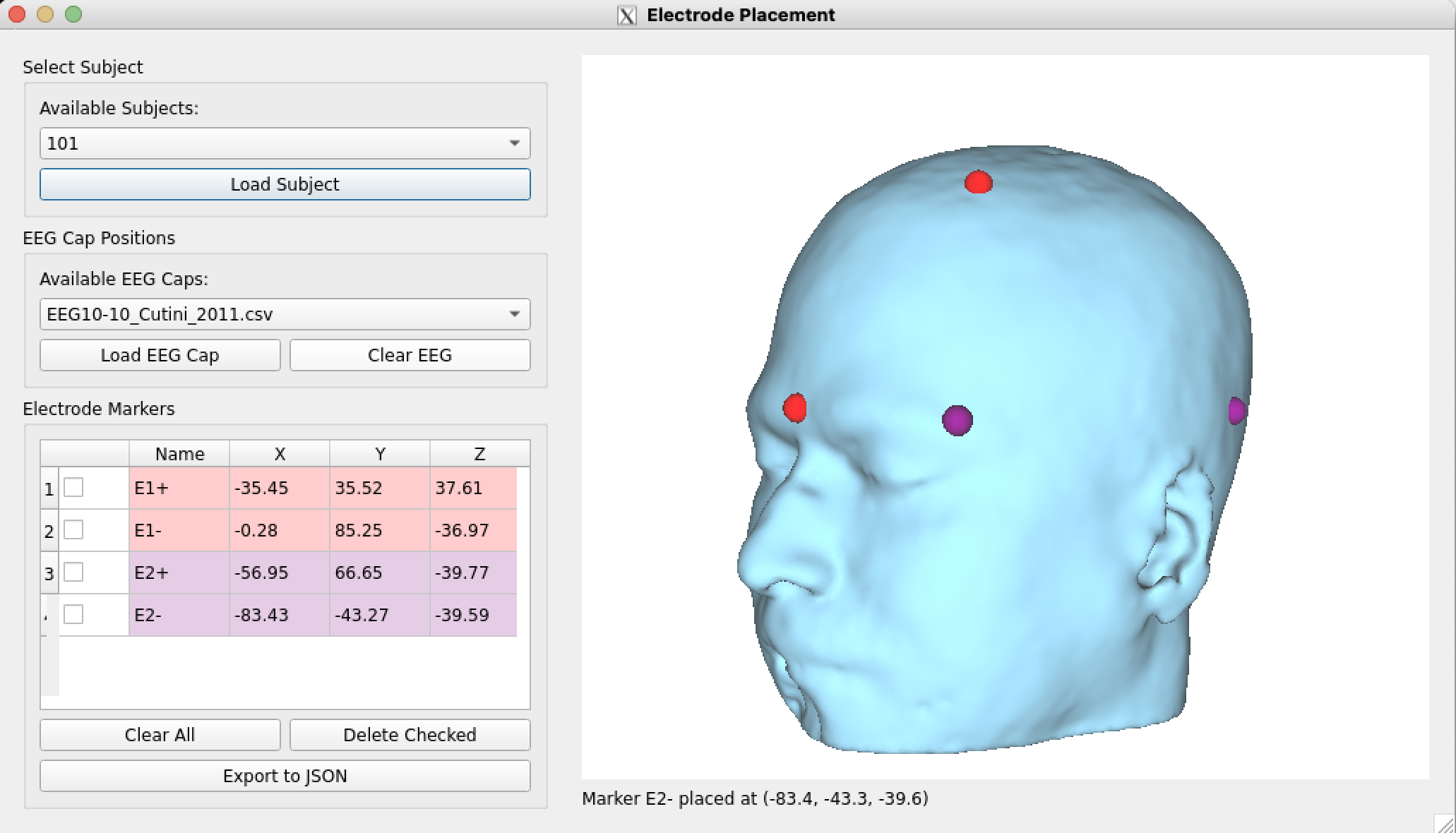
Figure: Interactive 3D electrode placement interface showing freehand positioning on head surface
Coordinate Management
- View Coordinates: All placed electrodes appear in the table with X, Y, Z coordinates
- Edit Coordinates: Double-click coordinate cells to modify positions numerically
- Delete Electrodes: Use checkboxes to select and delete multiple electrodes
- Real-time Updates: Changes in the table immediately update the 3D visualization
Data Formats
EEG Cap CSV Format
The extension supports EEG cap files in CSV format with the following structure:
electrode_type,X,Y,Z,electrode_name
EEG,85.2,-12.8,45.6,Fp1
EEG,92.1,15.3,42.8,Fp2
EEG,78.9,-45.2,38.1,C3
Requirements:
- Comma or tab-separated values
- Columns: electrode_type, X, Y, Z, electrode_name
- Coordinates in millimeters (SimNIBS coordinate system)
- No header row required
Export Configuration JSON
Electrode configurations are exported in a structured JSON format:
{
  "name": "custom_electrode_config",
  "type": "U",
  "electrode_positions": {
    "E1+": [85.2, -12.8, 45.6],
    "E1-": [92.1, 15.3, 42.8],
    "E2+": [78.9, -45.2, 38.1],
    "E2-": [88.4, -38.7, 41.3]
  }
}
Fields:
name: Configuration identifiertype: Stimulation type (“U” for unipolar, “M” for multipolar)electrode_positions: Dictionary mapping electrode names to [X, Y, Z] coordinates
File Structure
m2m_{subject_id}/
├── subject.msh              # Head mesh file (loaded automatically)
└── stim_configs/
    └── electrode_config.json # Exported configurations