Electrode Mapping
Electrode Mapping Tool
Overview
The map_electrodes.py tool maps optimized electrode positions to the nearest available positions in an EEG net using the Hungarian algorithm (linear sum assignment) for optimal matching.
Usage
Basic Usage
simnibs_python map_electrodes.py -i electrode_positions.json -n EGI_template.csv -o electrode_mapping.json
With Verbose Output
simnibs_python map_electrodes.py -i electrode_positions.json -n EGI_template.csv -o electrode_mapping.json -v
Note: This tool requires simnibs_python (SimNIBS’s bundled Python environment). If running outside Docker, ensure SimNIBS is properly installed and in your PATH.
Arguments
-i, --input: Path toelectrode_positions.jsonfile containing optimized positions (required)-n, --net: Path to EEG net CSV file containing electrode positions (required)-o, --output: Output path for mapping result JSON file (default:electrode_mapping.json)-v, --verbose: Print detailed mapping summary
Input Format
electrode_positions.json
{
  "optimized_positions": [
    [-85.61, -29.00, -8.56],
    [72.81, -44.38, -16.95]
  ],
  "channel_array_indices": [
    [0, 0],
    [0, 1]
  ]
}
EEG Net CSV
The tool supports multiple CSV formats commonly used in neuroimaging:
SimNIBS format:
Type,X,Y,Z,Name,Extra
Electrode,-85.5,-28.9,-8.4,E1,
ReferenceElectrode,0.0,85.0,0.0,REF,
Simple format:
Label,X,Y,Z
E1,-85.5,-28.9,-8.4
E2,72.9,-44.5,-17.1
REF,0.0,85.0,0.0
Notes:
- The tool automatically detects the format based on the first column
- Only
ElectrodeandReferenceElectrodetypes are included (Fiducials are ignored) - Empty lines and lines starting with
#are skipped
Output Format
The tool generates a JSON file with the following structure:
{
  "optimized_positions": [
    [-85.61, -29.00, -8.56],
    [72.81, -44.38, -16.95]
  ],
  "mapped_positions": [
    [-85.5, -28.9, -8.4],
    [72.9, -44.5, -17.1]
  ],
  "mapped_labels": ["E1", "E2"],
  "distances": [0.15, 0.12],
  "channel_array_indices": [[0, 0], [0, 1]],
  "eeg_net": "EGI_template.csv"
}
Features
- Optimal Assignment: Uses the Hungarian algorithm to find the globally optimal mapping that minimizes total distance
- Detailed Reporting: With
-vflag, provides detailed summary including per-electrode distances - Flexible Input: Supports multiple CSV formats commonly used in neuroimaging
- Error Handling: Validates input files and provides clear error messages
Integration with TI-Toolbox
This tool is automatically called by the flex-search optimization when the “Run simulation with mapped electrodes” option is enabled in the GUI. It can also be used standalone for post-hoc analysis or custom workflows.
EEG Net Density Impact on Optimization Performance
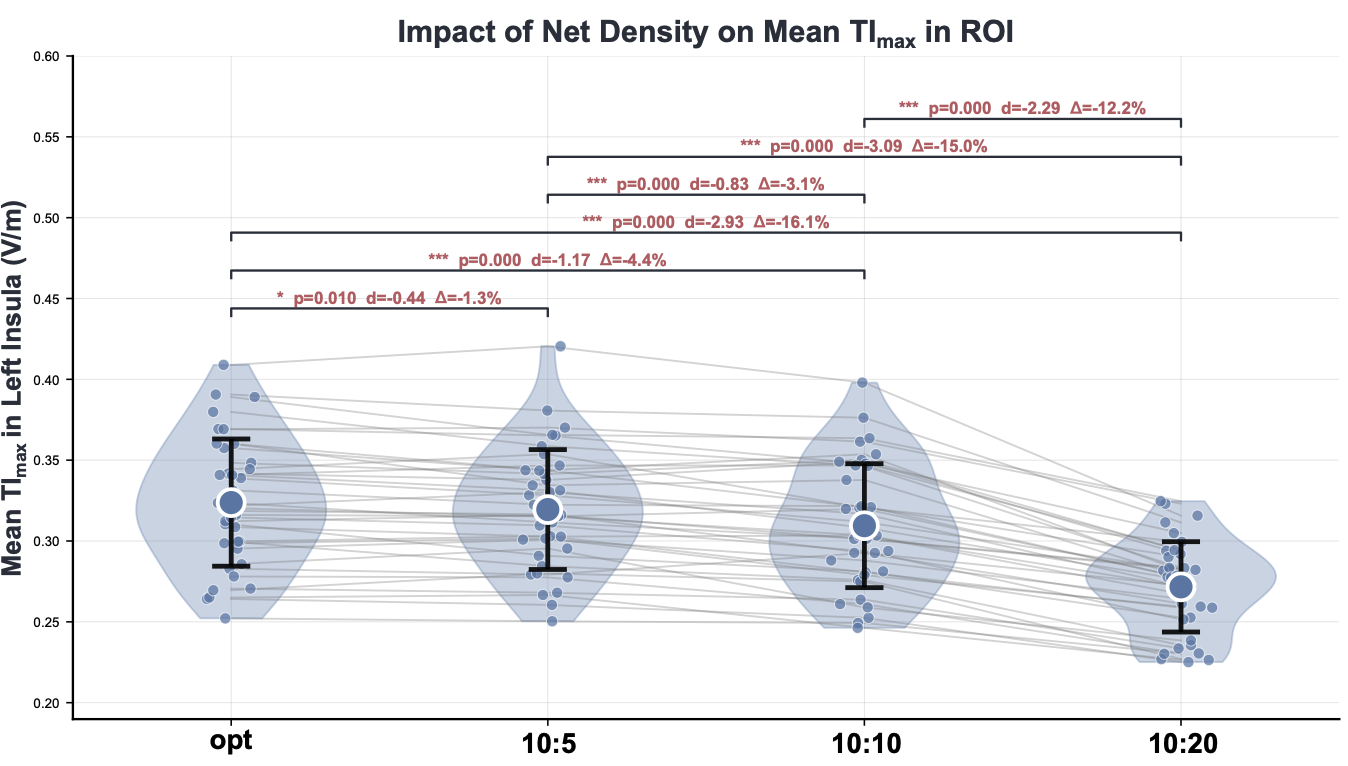
Impact of EEG net density on TImax intensity: This analysis demonstrates the progressive decline in achievable TImax intensity as electrode density decreases. Starting from fully optimized electrode positions (theoretical maximum), the study shows how mapping to standardized EEG nets progressively reduces field strength: fully optimized positions achieve maximum intensity, followed by 10:5 density (high coverage), 10:10 system (standard density), and finally 10:20 system showing the greatest reduction. This highlights the trade-off between practical electrode accessibility and theoretical optimization performance.
Example Workflow
- Run flex-search optimization to generate
electrode_positions.json - Use this tool to map to your specific EEG net:
simnibs_python map_electrodes.py \ -i output/electrode_positions.json \ -n path/to/your/EEG_net.csv \ -o output/electrode_mapping.json \ -v - Use the mapped positions for simulation or analysis
Notes
- If there are more optimized electrodes than available net positions, only the first N electrodes (where N = number of net positions) will be optimally mapped. Extra optimized electrodes will be ignored.
- Distances are reported in millimeters
- The tool preserves the channel and array indices from the optimization for downstream processing