Desktop Application
The TI-Toolbox Desktop Application is an Electron-based launcher that provides a user-friendly interface for running the Docker-based TI-Toolbox workflow across macOS, Windows, and Linux platforms.
Architecture Overview
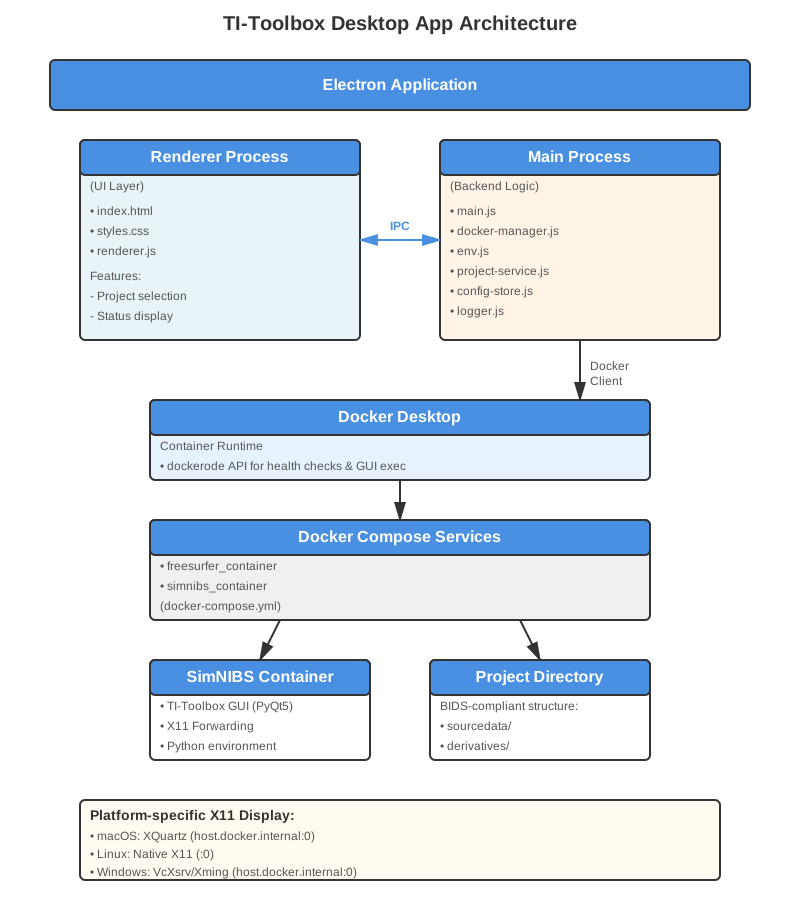
Components
Electron Application
The desktop app follows a standard Electron architecture with two main processes:
Renderer Process (Frontend)
The user interface layer built with HTML, CSS, and JavaScript:
index.html- Main UI markupstyles.css- Application stylingrenderer.js- UI logic and event handling
Key Features:
- Project directory selection and validation
- Docker status monitoring
- Launch and stop controls with progress feedback
- Real-time activity log display
- Platform-specific warnings and instructions
Main Process (Backend)
The Node.js backend that orchestrates all system operations:
main.js- Application entry point and window managementdocker-manager.js- Docker lifecycle control and API integrationenv.js- Environment setup (DISPLAY, timezone, xhost permissions)project-service.js- BIDS project validation and initializationconfig-store.js- User preferences persistencelogger.js- Structured logging with electron-log
Communication: The renderer and main processes communicate via Electron’s IPC (Inter-Process Communication) mechanism, enabling secure and efficient message passing.
Docker Integration
The app uses a dual approach for Docker integration:
- dockerode - Docker Engine API client for:
- Health checks (
docker version,docker.ping()) - Container discovery and inspection
- GUI process execution within containers
- Real-time log streaming
- Health checks (
- docker compose CLI - For multi-container orchestration:
- Building and starting the FreeSurfer and SimNIBS containers
- Managing volumes and networks
- Graceful shutdown and cleanup
The docker-compose.yml file is bundled with the application in package/docker/, ensuring the launcher works independently of the source repository.
Launch Workflow
- User clicks “Launch TI-Toolbox”
- Docker availability check - Verifies Docker Desktop is running
- Project initialization - Creates BIDS structure if new project
- Platform setup - Configures X11 display (XQuartz/VcXsrv/native)
- Volume creation - Sets up persistent Docker volumes
- Container startup - Launches docker-compose services
- GUI execution - Starts TI-Toolbox PyQt5 interface
- Active session - User interacts with the GUI
- Cleanup - Stops containers and reverts X11 permissions on exit
Platform-Specific Configuration
macOS
- X Server: XQuartz
- Display:
host.docker.internal:0 - Setup:
xhost +localhostfor container access
Linux
- X Server: Native X11
- Display:
:0(or from$DISPLAY) - Setup:
xhost +local:dockerfor container access
Windows
- X Server: VcXsrv or Xming
- Display:
host.docker.internal:0 - Path conversion: Windows paths converted to Docker-compatible format
IPC Events
Renderer → Main:
select-directory- Opens directory pickercheck-docker- Verifies Docker availabilitystart-toolbox- Launches the full stackstop-toolbox- Stops all containersget-log-path- Returns log file locationreveal-log-file- Opens log in file manager
Main → Renderer:
launcher-progress- Status updates (stage, message, timestamp)launcher-log- GUI process output stream
Building the Application
The app uses electron-builder to create platform-specific distributables:
macOS: .app bundle, .dmg installer, .zip archive
Windows: .exe installer (NSIS), portable .exe
Linux: .AppImage, .deb package
Build commands:
npm run build:mac     # macOS only
npm run build:win     # Windows only
npm run build:linux   # Linux only
npm run build:all     # All platforms
Development
Run in development mode with console access:
cd package
npm install
npm start
Dependencies
Runtime:
- Docker Desktop (required)
- X Server (platform-specific: XQuartz, VcXsrv, or native)
Development:
- Node.js 18+
- npm 9+
Security
- X11 Permissions: Temporarily granted for container access, reverted on exit
- Docker Access: Uses user’s existing Docker installation, no elevated privileges
- Code Signing: macOS builds include entitlements for JIT compilation (required for Python)
Performance
- Startup Time: ~3 seconds for container initialization
- Memory Usage: ~200MB (app) + Docker containers
- Disk Space: ~50MB (app) + ~5GB (Docker images)
Troubleshooting
Docker not found: Ensure Docker Desktop is installed and running.
X Server issues:
- macOS: Install XQuartz and enable “Allow connections from network clients”
- Windows: Install VcXsrv with “Disable access control” option
- Linux: Verify X11 is running and accessible
Permission errors:
Check that your user has access to the Docker daemon (usually requires membership in the docker group on Linux).